0
361 次瀏覽

In PT 8, I could insert consultant notes for a translation project and then chose to added it to selected projects. I tried to do this in PT 9, because I will be observing a consultant in training and want to do my preparation without him being aware of my questions, but I noticed that it was now marked with a blue cross where I had a consultant note. Is there a way to make this not marked? Or is there another methodology that consultants use for preparing so that their trainees are able to make their preparation without influence? Thanks!

舊文章 - 以原文顯示
Paratext (169 點) 提出 | 361 次瀏覽

4 個回答

0
最佳回答

There shouldn’t be any visible sign in the translation project that I have made a note in my consultant note. So anyone looking at the translation project would be unaware of which verses I have made comments on. Only by looking in my consultant notes project would anyone be able to see any of my notes until I chose to insert the note using the Multi button. Paratext8CN.pdf (239.8 KB)

While in Paratext 9, the verse in the translation project is now marked with a blue cross. Paratext9CN. I have circled the blue cross in the attached picture.
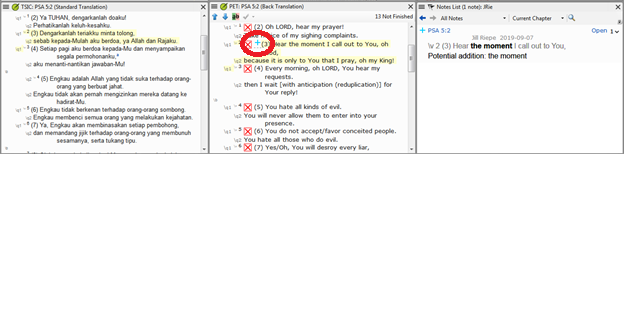
Not having it visible in the translation project comes in handy when working with consultant trainees, because I can do my preparation in Paratext without them seeing it. That way they aren’t influenced in their preparation by my notes or even to wonder why questions I might have asked on a particular verse because they can see that there is a note there, but not the content of the note since they don’t have permission to see my consultant notes project.


舊文章 - 以原文顯示
(169 點) 提出

The consultant note icon shows up if it has been turned on for a particular project. You can go to the project menu and look at View > Show Consultant notes… to see which notes have been made visible in that project.

These icons are only visible in your project - and are not shared with the project - so no one else would see those icons unless you intentionally share your consultant notes project and they set the view to be on for their project.

Please note that the icons can be turned on and off for any project (not just a specific project).

舊文章 - 以原文顯示
0

The behavior for consultant notes was not changed from PT8 to PT9 (at least not on purpose). Can you explain exactly what you were expecting it to do based on how you were using them in PT8?

舊文章 - 以原文顯示
[Expert]
(16.7k 點) 提出
0

If you go to View > Show consultant notes and turn it off for that project, does that give you what you want?

Consultant notes are visible from any project at any time (same as they were in 8.0).

舊文章 - 以原文顯示
[Expert]
(16.7k 點) 提出

已重新顯示
0

Yes, thank you, that worked. Now there is no mark. Thanks!

舊文章 - 以原文顯示
(169 點) 提出

相關問題

+1
2 個回答 310 次瀏覽
我正在顧問筆記專案中撰寫筆記,並使用「Multi」功能將其中一些複製到實際專案中 我有三個問題: 可以關閉「Only first comment in note will be added 」這個提醒嗎? 可以將最近用於分享的專案保留在清單中嗎 ... : XYZ1, ZYX2]」)資訊嗎? 有人能幫忙嗎?或者指出這些問題曾在哪些帖子中被回答過?非常感謝!
andre4w 155 提出 已提問 10月 14, 2020
0
1 個回答 189 次瀏覽
有辦法查出某一章的 Paratext 顧問註釋是否已被刪除嗎? 如果有,可以還原嗎?
listentwice 1.2k 提出 已提問 8月 13, 2024
0
2 個回答 315 次瀏覽
今天有使用者問我,如何更新全球顧問註解專案?需要執行 Send/Receive(傳送/接收)嗎?還是當 Paratext 更新時它也會跟著更新?
[Expert]
Jeff_Shrum
2.9k 提出
已提問 10月 26, 2020
0
3 個回答 512 次瀏覽
Dear all I wanted to convert a Consultant Notes created using Standard Translation Project (Not Registered) to a ... Project Please help if you know the solution blessings binoy
binoy 327 提出 已提問 5月 22, 2020
0
2 個回答 410 次瀏覽
A consultant has created a consultant notes project using English versification. He now wants to use it to check ... to adjust these notes short of a custom python script?
[Expert]
Jeff_Shrum
2.9k 提出
已提問 8月 3, 2018
Welcome to Support Bible, where you can ask questions and receive answers from other members of the community.
For just as each of us has one body with many members, and these members do not all have the same function, so in Christ we, though many, form one body, and each member belongs to all the others.
Romans 12:4-5
3,045 個問題
6,005 個回答
5,671 則評論
2,026 位使用者




