0
332 次瀏覽

I’m a translation consultant working with a translation project that has recently started using the Biblical Terms tool. I did a send/receive and noticed that one of the team members made changes to the renderings. Is there any way of telling what exactly was done? The recent changes dialog box only shows that changes were made to renderings without any indication as to what was done.

舊文章 - 以原文顯示
Paratext (159 點) 提出 | 332 次瀏覽

2 個回答

0
最佳回答

anon104217,
There is no way to track when a change to the Biblical terms rendering list was made. The SIL base plan references Biblical terms reports that list what Biblical terms have been changed and why, but I have not heard of plans of adding this kind of functionality to Paratext.
With some effort one could get records outside of Paratext. It is possible to export the Biblical terms renderings list as an html file and use that to make reports. If this were done on a regular basis, then one could compare the exported lists from various dates. Sorry there is not a more automated way to do what you to do.
image

舊文章 - 以原文顯示
[Expert]
(2.9k 點) 提出

anon044949,
Thanks for your suggestion. Adding the ability to see what Biblical Terms were edited recently would be a nice feature to add to Paratext.
anon104217

舊文章 - 以原文顯示
0

Hi anon104217,

We’ve been in the process of cleaning up keyterms recently, too. A couple of things that I’ve found helpful in keeping track of changed renderings are:

  • Clicking on “Project > Project history …” will bring up a report similar to the one you refer to after doing a send/receive. In this tool, though, you can filter the change history in various ways. You can filter it to show history points that include “Changes to Renderings” (or even just scan down the list for rendering changes), then click on the down-arrow to expand the descriptions of the changes made at that history point. Although, as you mention, it doesn’t indicate which renderings were specifically modified, I’ve found that many times that a keyterm rendering is changed, text where it appears is changed at the same time. So the book/chapter references that appear in the same history point as the indication of a rendering change is a good place to start.
  • Also remember that you can access a history of each term’s renderings. If you find a specific term that you suspect has changed, go to its “Edit Rendering” form (Tools > Biblical Terms … > Double-click on the rendering column for the term), then look for the “History” button to the right of the Renderings pane. I’ve found that a majority of rending changes that get recorded there are spelling changes, but I do encourage our team to make a note describing the reason for a change when it is more significant.

I hope one of these suggestions helps a little bit.

舊文章 - 以原文顯示
(129 點) 提出

anon104217,

Thank you for sharing about the History button in the Biblical Terms tool. As you say, if you suspect a term has changed you can go to that term and click on the History button. It is even more powerful if the team has been trained to enter the reason for the change.
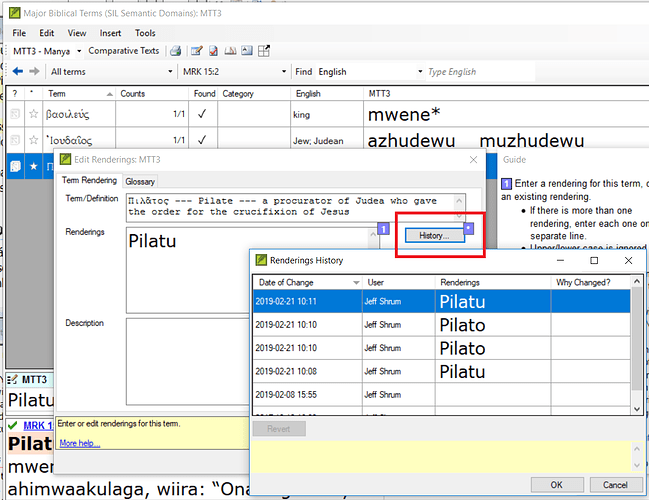
As you see in my example of Pilate, no reason was given for the change, but it appears to be a spelling issue.

If we had a tool to extract this information into a single human-readable report, it would be great.

anon044949

舊文章 - 以原文顯示

相關問題

0
1 個回答 287 次瀏覽
We have been working on a project since last year. We made lot of changes since last year. Now, when I click on ... are made after that and who has done that? Thanks, anon899536
UJ 162 提出 已提問 2月 1, 2019
0
3 個回答 330 次瀏覽
I'm not sure if I'm doing something wrong, but in PT8 if you click on a book name under a person's name in ... to work the same as PT8? Thanks! Send receive changes1254 531 119 KB
anon953007 213 提出 已提問 4月 7, 2020
0
1 個回答 378 次瀏覽
Hi I am working with a team to enter renderings in their Biblical terms tool. Their language marks the future ... this would negate the value of the checking. Thanks anon703820
anon703820 222 提出 已提問 11月 26, 2018
0
1 個回答 182 次瀏覽
其中一個團隊想知道,是否有自動化的方式可以從「聖經術語」(Biblical Terms)中移除舊的譯法。
SamuelG 109 提出 已提問 8月 29, 2024
0
1 個回答 305 次瀏覽
假設譯者為 προσκαλέω 選擇了兩種依語境而定的譯法:我們可以將其簡釋為 "call.to.come" 和 "send.someone.to.bring" 基於詞根的匹配運作良好,因此將這兩種譯法輸入 key terms renderings 工具後,會 ... - 只是目前似乎無法做到這一點.... a 請告訴我我錯了,並且某處隱藏著一個控制選項?
DG 1.1k 提出 已提問 11月 29, 2023
Welcome to Support Bible, where you can ask questions and receive answers from other members of the community.
I appeal to you, brothers and sisters, in the name of our Lord Jesus Christ, that all of you agree with one another in what you say and that there be no divisions among you, but that you be perfectly united in mind and thought.
1 Corinthians 1:10
3,045 個問題
6,005 個回答
5,671 則評論
2,026 位使用者






