0
350 次瀏覽

Hello, many of you might rarely use the \tl, so here is the definition from usfmReference2_4.pdf:
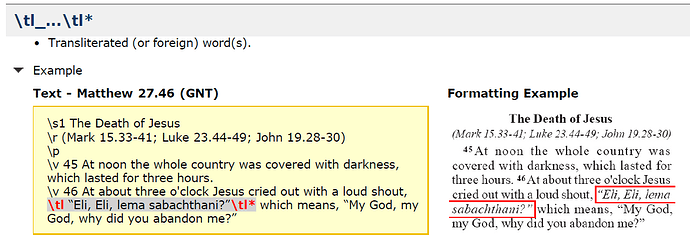
So it is obvious that “unknown” characters almost must happen inside any \tl Ik dee tell juu!\tl*

And all those false alerts are making the checking-work really bad. I always tell people here: Never ever get used to ignore (faulty) alert-lamps in your car. When you have the next real problem, your brain will just ignore the little red light and your engine might all seize up from lack of oil or whatever.

I looked this up in our custom project style sheet, this marker is still at its default settings:

\Marker tl
\Endmarker tl*
\Name tl...tl* - Special Text - Transliterated Word
\Description For transliterated words
\OccursUnder ip im ipi imi ipq imq ipr iq iq1 iq2 iq3 io io1 io2 io3 io4 ms ms1 ms2 s s1 s2 s3 s4 cd sp d li li1 li2 li3 li4 m mi nb p pc ph phi pi pi1 pi2 pi3 pr pmo pm pmc pmr q q1 q2 q3 q4 qc qr qm qm1 qm2 qm3 cls tr th1 th2 th3 th4 thr1 thr2 thr3 thr4 tc1 tc2 tc3 tc4 tcr1 tcr2 tcr3 tcr4 f fe NEST
\TextType VerseText
\TextProperties publishable nonvernacular
\StyleType Character
\FontSize 12
\Italic

As you can see, it is tagged as nonvernacular. So I wonder why the invalid or unknown character check is even applied at all. What else could we do, to un-alert this check for anything we need to put into marker \tl?

I have not filed this as a bug, still hoping we are just missing a configuration. It was very thoughtful to create this option of having foreign words in PT, but to work properly those need to be treated special during checking.


舊文章 - 以原文顯示
Paratext (934 點) 提出
已重新顯示 | 350 次瀏覽

1 個回答

+1
最佳回答

These are those places where the checks get quite involved. With characters things can get even more complicated. Any character found in the language should be added to the Alphabetic Characters tab of the language settings. This will cause them to be automatically marked as “Valid” characters in the Character Inventory.

All other characters are marked as “Unknown” until someone marks them as either Valid or Invalid. In the case of characters in the \tl…\tl* field, these will show up as unknown because the are characters in the text and the inventory is showing the characters in the text.

Unfortunately there is currently no way to identify characters as only valid in certain circumstances.

There are basically two choices - 1) mark them as valid, but in this case if they show up somewhere where they shouldn’t they will not be identified as questionable, or 2) mark them invalid (or leave them unknown) in which case the will be reported as errors and you can “deny” the error by using the Edit > Deny Error option in the list window.

舊文章 - 以原文顯示
(9.9k 點) 提出

Yes, that is exactly my question, as anything inside the \tl markers is by definition not in the language. We discovered this problem, when we added some Greek terms for coins into our glossary entries.

So @anon848905 this second option is the solution to our need: Since those \tl occasions are not too many and since the “deny-error” is not working globally but specifically for each occurrance of a certain error (I just did some tests, as this is not mentioned in the inbuilt-help), I can manually deny those false-errors in our glossary and still stay alert for such typos in the main text.

The PT help is saying this:

After you run a basic check, you might decide that certain reported “errors” are not errors, but instead are deliberate deviations from what was specified in the inventory, rules, or settings for that check. You can “deny” such “errors” so that they don’t appear in the list the next time you run the check.

And it might be helpful to add to help that this denial, is working on a case-by-case system. So if I find the character “ö” in LUK 17:10 and I deny this error (for whatever reason), then another occurrence of “ö” would still be flagged by the Character Inventory check.

For the Shotcut video-editor we are using the same forum-program. And there they have a feature where you can mark a thread or a question as “solved”. I do not see this option, but maybe one of the forum administrators can do this. Because this user has found a pragmatic working solution. User is happy.

Thank you anon848905!!

舊文章 - 以原文顯示

Just to add one more clarification - or possibly muddy the water. The character inventory is NOT an inventory of the characters in the “language”. The characters in the language should be listed in the Alphabetic Characters of the Language settings. The Character Inventory is a list of ALL characters in the text. Therefore even though a Greek letter might not be a character in the language, it is a language in the text and shows up in the inventory.

舊文章 - 以原文顯示

Yes, thank you. We have properly filled out all the Language settings from the beginning and had another walk-through after the migration to PT8.

In normal work, the character inventory is mainly helping us to find typos and some junk that would sneak into a text through various hiccups. That is why I am reluctant to declare valid certain characters that are not part of the main language.

舊文章 - 以原文顯示

The philosophy I teach in our Scripture Typesetting Workshops is if the character is listed in the inventory but is not valid inside the rest of in the scripture text is,

  • mark it as invalid in the Inventory

  • close the Inventory

  • run the character check

  • deny the error indicating you have checked it in that instance and it is valid there.
    That’s the concept. Here are the actual steps I perform to accomplish that.
    What I typically do if there are a lot of other language characters only valid inside the \tl \tl* markup is :

  • run the character check.

  • In the List Window, click Sort from it’s menu bar

  • select sort by message.
    That should group the list of common characters.
    Since you are wanting characters in the \tl markup I use a regular expression that looks for occurrences of that character inside the \tl \tl* markup.

  • run find

  • enter the following expression in the find box:
    regex:(?<=\\tl[^\\].*?)[kKjJzZ](?=.*?\\tl\*)

  • Change the letters [kKjJzZ] inside the square brackets to your list of special characters used only inside the \tl markup—but that should not occur in the rest of the scripture text.
    The list inside the [ ] should look like this:
    [kKjJzZ]
    which is looking for lower and upper case versions of the letters j, k, z.
    image

  • click on the “Create List” drop down list in the bottom right of the dialog and

  • select “Shared With List”.

  • Then click on the “Find” button. What you will get is a filtered list for those particular characters.

  • Select all the matches in the List Window by

  • clicking on the first entry,

  • hold the shift key while scrolling to the bottom of the list,

  • while still holding shift, click on the last entry,

  • With all of the \tl only characters selected

  • Click on Edit in the List Window,

  • and then click on Deny.
    Then rerun the Character Check and deal with only bad characters in the rest of the scripture text.
    Hope this helps with denying those special characters that should only occur in \tl text.

D anon467281

Admin edit: Attempt to fix formatting problems from e-mail.

舊文章 - 以原文顯示

相關問題

0
2 個回答 360 次瀏覽
我在腳註中使用 \tl \tl* 來標記音譯的外來詞(希臘文和希伯來文) 其中一個腳註如下: \f + \fr 16.13 \fq mani \ft ... publishable nonvernacular \StyleType Character \FontSize 12 \Italic 為什麼我會收到這個錯誤? john_nystrom
john_nystrom 312 提出 已提問 8月 17, 2022
0
1 個回答 309 次瀏覽
昨天,當使用者開啟 Paratext 9.1 時,出現了以下彈出警告訊息: Le projet Ban sur votre ordinateur n'a pas pu être ouvert. .', valeur hexadécimale 0x00, est ... 可以正常開啟專案,但每次開啟 Paratext 時警告訊息仍然存在 我該如何消除它?
n8_in_car 298 提出 已提問 11月 17, 2021
0
3 個回答 275 次瀏覽
In the Luvale Bible translation (Zambia, Africa), we are using \tl to identify transliterated words, \pn for ... for your help. paulpoid, Luvale Bible Translator, ZBS, Zambia
paulpoid 118 提出 已提問 3月 11, 2019
0
1 個回答 184 次瀏覽
In a figure there are attributes like alt, src, size and ref. The markers check in Paratext 9 claims that these are unknown. ... or 3. Is this a bug or am I doing something wrong?
Iver Larsen 869 提出 已提問 7月 27, 2020
+1
3 個回答 452 次瀏覽
嗯,在遵循「變更簡短名稱」討論串中的建議後,我成功地轉換了我們的專案 但現在每卷書的開頭都有三個新的標記(\toc3 \toc2 \toc1)--按此順序排列 然而,PT 似乎無法識別這些標記 它們顯示為紅色,且在執行「標記檢查」時 ... 法識別這些標記嗎?畢竟,是 PT 在轉換過程中將它們放在那裡的 我們之前並沒有這些標記 也許這是一個錯誤(bug)?
anon233143 252 提出 已提問 5月 17, 2018
Welcome to Support Bible, where you can ask questions and receive answers from other members of the community.
Live in harmony with one another. Do not be proud, but be willing to associate with people of low position. Do not be conceited.
Romans 12:16
3,048 個問題
6,007 個回答
5,672 則評論
2,028 位使用者





