0 票
384 次浏览

We just recently migrated a set of parallel Roman/Arabic script projects. Note that the parallel is “manual”, not a PT8 transliteration using Encoding Converter, so in a sense they are two independent projects, but with the same language code (shu). For one team member who only has the RS project, everything appears fine. For the two machines that have both the RS and AS projects, there is a weird use of the AS font (Scheherazade) for some of the functions in the RS project. The text itself appears fine in the main project window (using Times New Roman font), but if you Insert > Note…, all of a sudden it starts using Scheherazade font, and thinks that it is RTL:
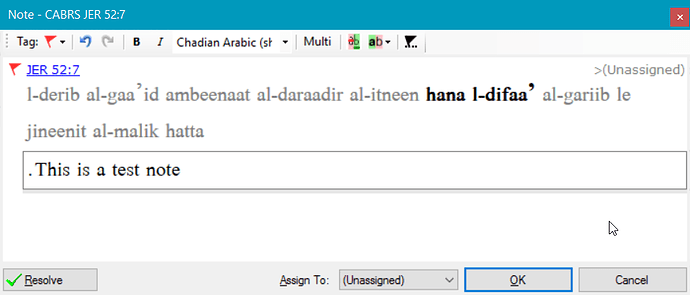
Note the period at the left, but it was typed last. There are similar problems with texts that are displayed in the Biblical terms and Parallel passages tools. All of the language settings appear to be correct in Paratext (specifically not RTL).

In poking around, I found the shu.ldml file, which seems to contain language settings. It ends like this:

sil:external-resources<sil:font name=“Scheherazade” /><sil:font name=“Times New Roman” /></sil:external-resources>

Is that where it is getting Scheherazade to use in those tools? But why would it be using it, and why are things RTL? Can I just delete that element from the ldml file? Seems kind of dangerous to me, and doesn’t seem like it would address the RTL problem anyway. I’d appreciate any help you can give me.


较早的帖子 - 以原始语言显示
Paratext 中 由 (1.4k 分) 发布 | 384 次浏览

3 个回答

0 票
最佳答案

In Paratext 8.0+, the language code identifies the language, not the name. I think the problem is that the languages for both projects are using the same language code. If one is a transliteration of a RTL language in LTR, then you should add some script information to the code for the LTR version (e.g. shu-Latn).

较早的帖子 - 以原始语言显示
由 [Expert]
(16.7k 分) 发布

已重新显示
0 票

Thank you. That was the correct diagnosis, and your suggestion resolved the problem. In the Paratext registry for the projects online (you can’t make changes to language settings from within Paratext), I clicked on the Advanced checkbox next to Language and it showed me options such as Script. So I selected Latin (so the code became shu-Latn) for the RS version and Arabic (shu-Arab) for the AS version.

When I had done the project configuration before, I hadn’t noticed the Advanced checkbox. I think I was thrown off by the Dialect field which appears below the Language field. I was expecting to have to select Arabic script for the AS projects, but the Dialect drop-down menu didn’t show me anything that seemed to apply. So I just skipped over it at the time, not even noticing the Advanced checkbox to the right of the Language field. Maybe that page could be redesigned so that the Advanced checkbox appears below the Language field rather than to the right of it, so it’s more noticeable? And maybe some additional help can be provided next to it as well, something like:

[ ] Advanced (check this box to specify script, region or variant options)

But the problem has been resolved. Thanks.

较早的帖子 - 以原始语言显示
由 (1.4k 分) 发布
0 票

Hi jeffh,

I don’t think I can be of much help here. Iska, any ideas? My one thought is that maybe it’s a keyboard issue. What keyboards do you have each project set for?

Sorry,

Ron

P.S. I didn’t see a 2nd image for the ldml file

较早的帖子 - 以原始语言显示
由 (336 分) 发布
已重新显示

This was resolved by setting the script in each project, shu-Latn and shu-Arab.

较早的帖子 - 以原始语言显示

相关问题

0 票
1 个回答 255 次浏览
在一个 RTL Paratext 项目中,我尚未找到任何一组《圣经》引用设置 经文文本和模块规范能够完美协同工作 《圣经》引用必须在章节-节分隔符(:) 节范围分隔符(-)和章节范围分 ... 例如在 Scripture App Builder Publishing Assistant 等中 但 Paratext 一定有一种正确的方法来处理这个问题,对吧?
Denny Emser 115 发布 提问于 九月 16
0 票
2 个回答 306 次浏览
我正在使用 Noto Nastaliq Urdu 字体准备文本。但我需要在 changes.txt 编辑界面中使用罗马字体,以便能够阅读我的输入。目前它只显示“豆腐块”(乱码方框)。我尝试在 Font/Script 设置中使用罗马字体,并将相应的样式标记更改为乌尔都语字体,但当我尝试打印时,PTXprint 挂起了。有什么建议吗?
mlucas53 148 发布 提问于 七月 22, 2024
PTXprint 中
0 票
1 个回答 330 次浏览
There is a thread in TCoP regarding non roman projects that want to use variable spacing after phrase final (, ; ... then accessed by You Version and other library card holders?
anon467281 571 发布 提问于 十月 24, 2018
0 票
1 个回答 393 次浏览
我提供技术支持的一个项目中,在不该出现 RTL 标记的地方散布着许多 RTL 标记 该项目是一个 RTL 项目的回译,但所有文本均为英文 我不知道这些标记是如何出现的,但我注意到 RTL 标记大多位于经文编号内 ... 了变化 能否让 Paratext 显示不可见的控制字符? 据我所知,基本检查(Basic Checks)并没有捕获到这些 RTL 标记
[Moderator]
Nathaniel Paulus
158 发布
提问于 五月 24, 2023
0 票
3 个回答 1.1k 次浏览
我正在尝试微调一个 .tec 编码转换器,以便使其对于从左到右(LTR)音译一个从右到左(RTL)语言项目来说是往返安全的 (这使得可以与原文进行比较,以确保拉丁字母一侧正字法上的调整没有引入任何文本变化 ) 主要障碍是出现在经文 ... 用正则表达式做到这一点,但为了那些不熟悉 RegexPal 的人,我希望使其自动化 关于如何做到这一点,有什么建议吗?
DVM 175 发布 提问于 三月 17, 2021
Welcome to Support Bible, where you can ask questions and receive answers from other members of the community.
And let us consider how we may spur one another on toward love and good deeds, not giving up meeting together, as some are in the habit of doing, but encouraging one another—and all the more as you see the Day approaching.
Hebrews 10:24-25
3,060 个问题
6,021 个回答
5,687 条评论
2,035 位用户




