0 votes
375 vues

I am having a (new)
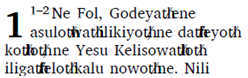
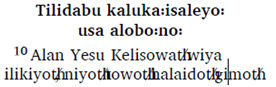
problem with Print Draft. The output file is not handling the one special character we use, which is appears similar to a colon but is actually A789. The characters show up fine on screen and when ouput to RTF, but render incorrectly in PrintDraft. Even in PrintDraft output, this character (A789) appears fine in headings and sub-headings in the PDF file, but in all text formatted as verses, it shows up instead as a “th/” (where the slash overwrites the “th”.

Here is a
screen capture from a Standard View in Paratext (which displays correctly):
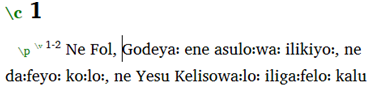
image

Here is a screen capture of the same verses from the PDF produced by PrintDraft:
image

And here is a screen capture showing both the sub-heading (correctly displayed) and the following verse (incorrectly displayed):
image

The “th/” character is being substituted for the “꞉” character. This ONLY happens when I output to Charis SIL font, which is my preferred font because of the way that this specific character is rendered in that font.

Any thoughts on why this problem has shown up? I spent several months in a remote location without access to a printer, so I hadn’t used PrintDraft for some time. So I’m not sure what I changes to my system may have occurred since it last worked okay.

Thanks for any help.

anon101508

Ancienne publication - affichée dans sa langue d'origine
Paratext par (117 points) | 375 vues

4 Réponses

0 votes
Meilleure réponse

Was this ever resolved or do you still need help? It’s hard to imagine the problem is in the font. I wonder if we could look at the files in the PrintDraft folder to see if something is being incorrectly converted.
Lorna

Ancienne publication - affichée dans sa langue d'origine
par (329 points)

Lorna - you can test this by putting an A789 character in a text and then doing a Print Draft. My experience was that if the font was CharisSIL it gave the error, but if I changed the font to something else it worked.

Ancienne publication - affichée dans sa langue d'origine

After fairly extensive testing on my computer, I’ve found only a handful of fonts (out of over 100) that still work, and unfortunately, these four are unsuitable in other ways for my Scripture printouts (e.g. Doulos works, but appears to not have bold, so subheadings do not appear in bold. And the A789 character in Times New Roman is very hard to read, which is why I use Charis.) All other fonts (besides TNS, Doulos, Andika, and a handful of others) now fail to produce the character at all. For me, the only workable solution is to abandon Print Draft and go back to Export to RTF and then use SILAS to format my draft prints.

Ancienne publication - affichée dans sa langue d'origine

Can anon848905 and/or anon101508 send me the resulting pdf and also the PrintDraft-mods.tex files from the PrintDraft folder? I’m not seeing this issue in 7.5 or 7.6. I don’t know how to create a dummy project in 8.0 to test it. You have to register the project in order to use PrintDraft and I’ve forgotten how to do that. (I’d appreciate if if someone would remind me what I have to do to register a project that is used only in testing.)
Lorna

Ancienne publication - affichée dans sa langue d'origine

anon101508, I’m wondering if you are aware that you can get XeTeX (used in the PrintDraft feature of Paratext) to fake bold and italic fonts faces by tweaking the PrintDraft-mods.tex file as shown in the following example. This would allow you to keep using Charis SIL with PrintDraft directly without having to export to RTF etc.

%%%%% Fonts %%%%%
%% Faces
% This example shows a method for producing fake bold and italic faces.
% Replace Font names with real values (and remove script and/or mapping parameters as needed)
\def\regular{“Annapurna SIL:script=deva;embolden=-1.8”}
\def\bold{“Annapurna SIL:script=deva;embolden=2.2”}
\def\italic{“Annapurna SIL:script=deva;slant=0.2”}
\def\bolditalic{“Annapurna SIL:script=deva;embolden=2.2;slant=0.2”}

Ancienne publication - affichée dans sa langue d'origine
0 votes

anon101508,

In my tests this appear to be a problem with the CharisSIL font. Other fonts work fine (Times New Roman, DoulosSIL, Gentium, etc) but for some reason CharisSIL version 5.000 is causing this error. I’ll report the issue.

This problem does not occur in Paratext 8.0!

Ancienne publication - affichée dans sa langue d'origine
par (9,9k points)
réaffiché
0 votes

Strange… For what it’s worth:

it’s taken me a while to get around to looking at this, but neither PT 7.6 nor 8.0 on my Linux computer has the problem anon101508 describes; the A789 character displays perfectly using Charis SIL in PrintDraft. I entered some of anon101508’s text into PT 8.0, one line of \s Section Heading and another line starting with "\p \v 1 ".

I have had a couple of PrintDraft issues recently but I don’t see anything that looks to be related to this. But maybe the fact that it’s OK in PT-L could give someone a clue?

Ancienne publication - affichée dans sa langue d'origine
par (670 points)
0 votes

Lorna -

I’m not sure if something has been fixed in PT8. It has gone through a couple of updates since I saw the problem. Now I am no longer able to recreate the issue so I’m hoping that it is fixed. I’m now running PT 8.0.100.21 (pre-release version)

Ancienne publication - affichée dans sa langue d'origine
par (9,9k points)

Questions connexes

+2 votes
1 réponse 202 vues
A user reported on another list that a font they installed on Windows 10 was not working with PrintDraft. ... could possibly have the same issue if Paratext called fontconfig.
Bobby 185 posée mai 29, 2019
0 votes
1 réponse 288 vues
How can I adjust my PrintDraft output so that the verse numbers are not superscript?
anon010520 110 posée avr. 20, 2019
0 votes
7 réponses 573 vues
We've noticed some formatting problems in PrintDraft around \b and \q1 markers. For example, with the following text: \v 7 ... , but haven't come up with it yet. Any suggestions?
jeffh 1,4k posée mars 9, 2018
0 votes
0 réponses 133 vues
When I run PrintDraft, I immediately get an error about Marker errors detected even when running the actual Run Basic ... error in my PT8 setup and not in a particular project.
mnjames 1,9k posée nov. 5, 2017
0 votes
1 réponse 179 vues
I'm having a problem with footnote and cross-reference callers Here's a sample: \f + \fr 2:4 \fk Keyword \ft ... cause the callers to show. I'd appreciate your help with this.
Paul 642 posée févr. 12, 2016
Welcome to Support Bible, where you can ask questions and receive answers from other members of the community.
And let us consider how we may spur one another on toward love and good deeds, not giving up meeting together, as some are in the habit of doing, but encouraging one another—and all the more as you see the Day approaching.
Hebrews 10:24-25
3,044 questions
6,003 réponses
5,671 commentaires
2,026 utilisateurs





