我花了不少時間才弄清楚如何從一個我不擁有的顧問註釋(Consultant Notes)專案中移除自己,所以我想分享一下我找到的步驟。
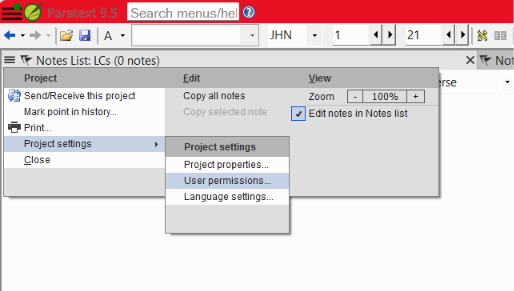
從專案選單中,前往「專案設定(Project Settings) > 使用者權限(User Permissions)...」
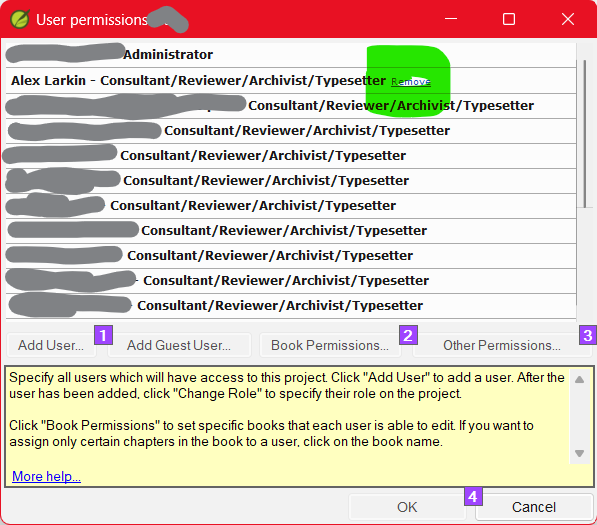
在清單中,點擊您名字旁邊的「移除(Remove)」。

點擊「是(Yes)」。這也會移除您電腦上的本地副本。
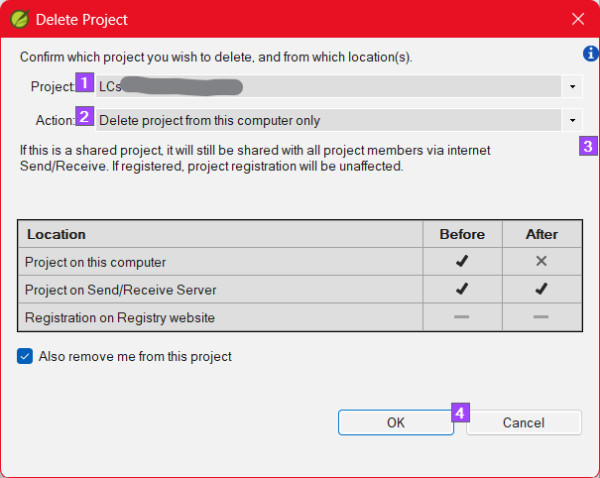
「同時將我從此專案中移除(Also remove me from this project)」應該已經被選取。點擊「確定(OK)」。
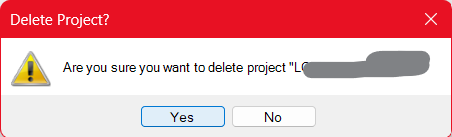
在最後的確認對話框中點擊「確定(OK)」。- 專案就會消失。
也許有更簡單的方法。如果有,歡迎留言!
I had a hard time figuring out how to remove myself from a Consultant Notes project that I don't own, so I thought I'd share the steps I found.
From the project's menu, go to "Project Settings > User Permissions..."
Click "Remove" next to your name in the list.
Click yes. It will also remove your computer's local copy.
"Also remove me from this project" should already be selected. Hit "OK"
Click "OK" on the final confirmation.- The project disappears.
Maybe there is an easier way. If so, feel free to comment!
機器翻譯自 English