Saya kesulitan mencari tahu cara menghapus diri saya dari proyek Catatan Konsultan yang tidak saya miliki, jadi saya memutuskan untuk membagikan langkah-langkah yang saya temukan.
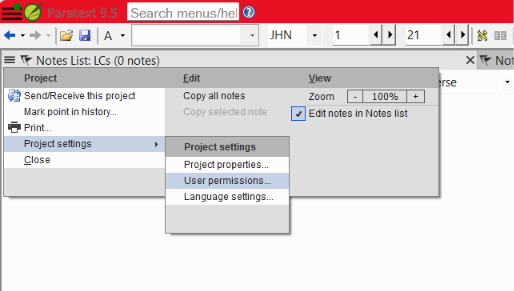
Dari menu proyek, buka "Project Settings > User Permissions..."
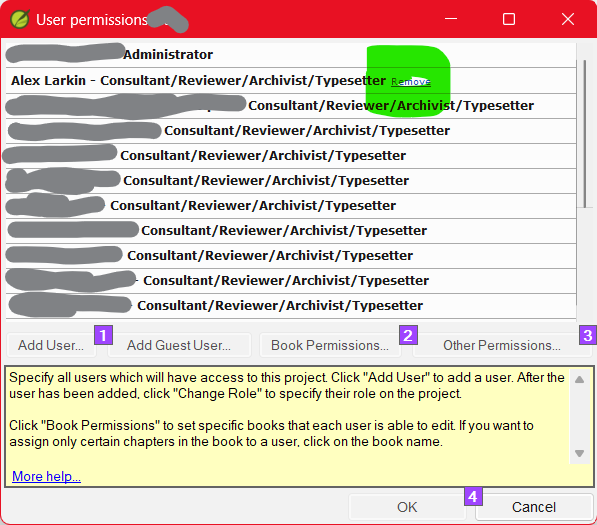
Klik "Remove" di sebelah nama Anda dalam daftar.

Klik ya. Salinan lokal komputer Anda juga akan dihapus.
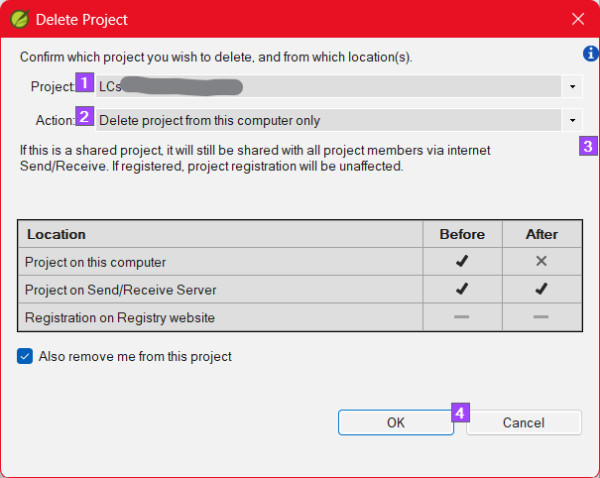
"Also remove me from this project" seharusnya sudah dipilih. Tekan "OK"
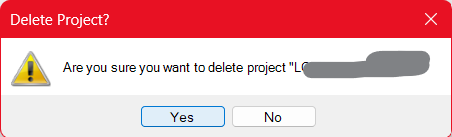
Klik "OK" pada konfirmasi terakhir.- Proyeknya hilang.
Mungkin ada cara yang lebih mudah. Jika ada, silakan berkomentar!
I had a hard time figuring out how to remove myself from a Consultant Notes project that I don't own, so I thought I'd share the steps I found.
From the project's menu, go to "Project Settings > User Permissions..."
Click "Remove" next to your name in the list.
Click yes. It will also remove your computer's local copy.
"Also remove me from this project" should already be selected. Hit "OK"
Click "OK" on the final confirmation.- The project disappears.
Maybe there is an easier way. If so, feel free to comment!
Diterjemahkan secara otomatis dari English