我花了不少时间才弄清楚如何将自己从一个我不拥有的顾问笔记(Consultant Notes)项目中移除,所以我想分享一下我找到的步骤。
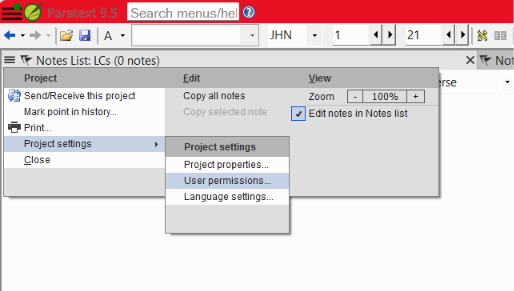
从项目菜单中,前往“Project Settings > User Permissions...”(项目设置 > 用户权限...)
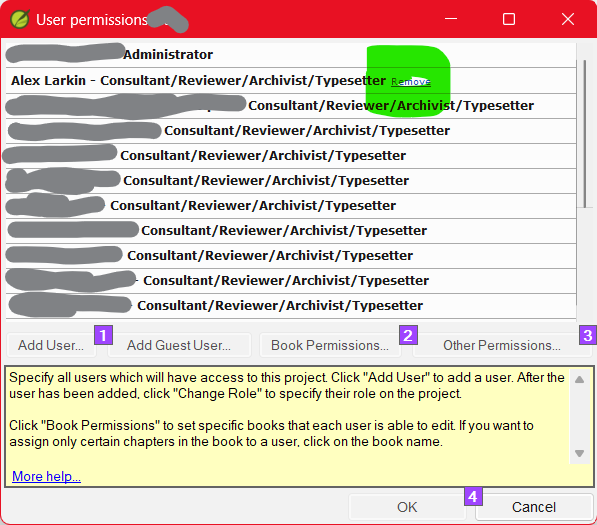
在列表中点击您姓名旁边的“Remove”(移除)。

点击“是”。这也会移除您计算机上的本地副本。
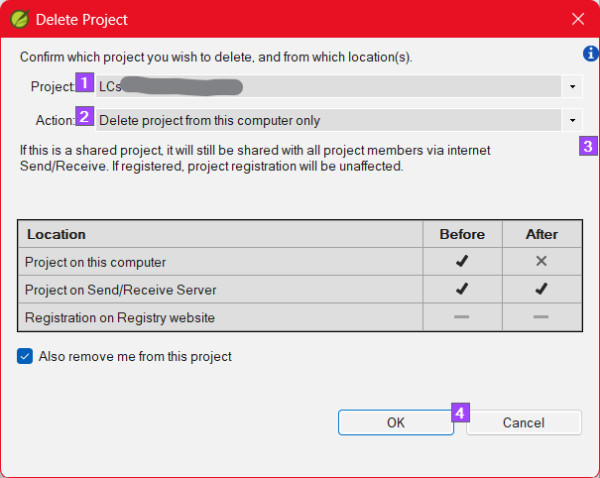
“Also remove me from this project”(同时将我从此项目中移除)应该已经选中。点击“OK”(确定)
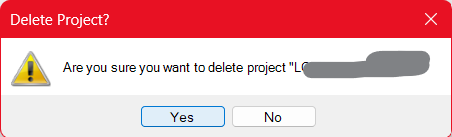
在最终确认对话框中点击“OK”(确定)。- 项目消失了。
也许有更简单的方法。如果有,请随时评论!
I had a hard time figuring out how to remove myself from a Consultant Notes project that I don't own, so I thought I'd share the steps I found.
From the project's menu, go to "Project Settings > User Permissions..."
Click "Remove" next to your name in the list.
Click yes. It will also remove your computer's local copy.
"Also remove me from this project" should already be selected. Hit "OK"
Click "OK" on the final confirmation.- The project disappears.
Maybe there is an easier way. If so, feel free to comment!
机器翻译自 English