0 votos
14 visualizações
[Hypothetical description based on a real event]

A team member had a Windows crash which corrupted a book in our project. When he did a send/receive the corrupted version did not get replaced, but it replaced the good version for everyone. Our admin tried to undo that user's changes in Project History. That got rid of the corruption but it did not bring back all the latest changes to the book. What should be done?
Paratext atrás por [Expert]
(3,3k pontos)
| 14 visualizações

2 Respostas

0 votos

Unfortunately, I think you'd have to use Compare versions to look at all the changes made to the text by the other users and merge them back in.

atrás por [Expert]
(16,7k pontos)
Just what I was about to say, Tim. Good job!
0 votos

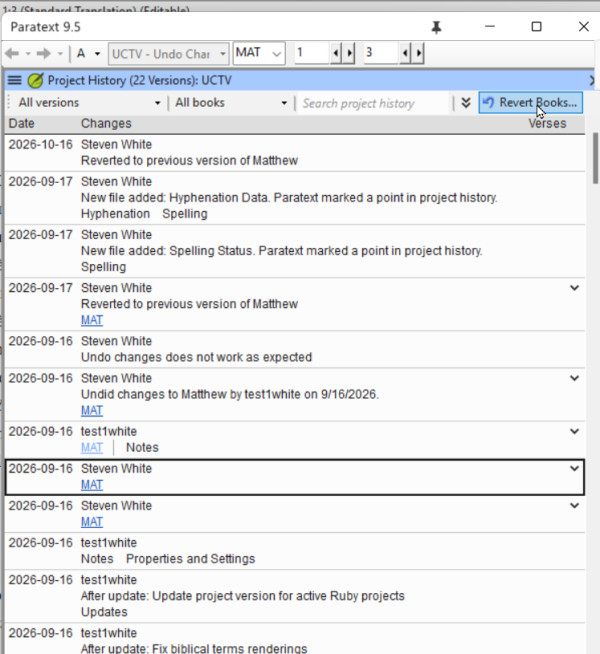
I have seen this happen. It turns out, that if the team member did not have the latest version of the book when the corruption took place, Undo changes does not roll back to the latest version, but to the version that user had on their computer. 
If a file gets corrupted and then sent, the admin should verify what version of the book or books they are going to get if they undo changes.

When you find in Recent Changes or Project History the point where the file was corrupted, click the link to open compare versions, and examine the right hand side. That is the version that Undo changes will roll back to. If that is not the latest version, look at other changes to that book, and when you find the latest good changes, use the Revert books command to bring that version back. 
image

Some general principles that also might help avoid this scenario.
1. If you have a systems crash and you detect something bad has happened to your Paratext project, DO NOT send receive the corrupted project.  Delete the project from your computer, then do  a send/receive to get the uncorrupted project from the server.

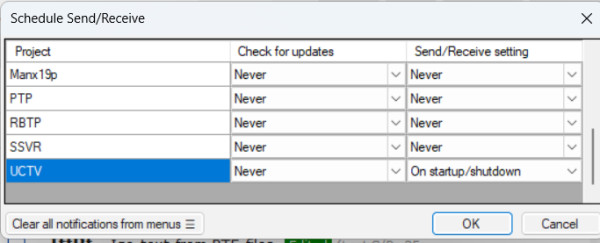
2) If you have a good and inexpensive Internet connection, always do send/receive before you start work in Paratext (to get the latest changes from your teammates) and send/receive when you finish work in Paratext.  You can make this automatic by scheduling your send/receive on startup and shutdown: This will decrease the possibility that Undo Changes would not bring back the latest version. 
image

atrás por [Expert]
(3,3k pontos)

Perguntas relacionadas

0 votos
0 respostas 220 visualizações
Não consigo colocar números como os primeiros caracteres em uma célula de tabela em um documento RTL sem adicionar marcadores e espaços ... ] 456 \tr \tc1 [LTR]123 \tc2 [LTR]456
Kent Spielmann 1,8k perguntada Fev 3, 2022
0 votos
2 respostas 976 visualizações
Uma das melhorias da 9.4 Beta é descrita da seguinte forma: Verificação de citações aprimorada. O novo Basic Check Quotation Types ( ... 7.4" para "9.3" e "9.4", respectivamente]
Iver Larsen 869 perguntada Set 1, 2023
0 votos
3 respostas 743 visualizações
Estou tentando inserir um conjunto de expressões de figuras (\fig \fig*) em um projeto usando a ferramenta ... maneira de inserir figuras em lote no projeto? Paulus+Kieviet
Paulus Kieviet 517 perguntada Jan 25, 2023
0 votos
3 respostas 561 visualizações
Em um recente workshop de Introdução ao Paratext, um dos participantes estava usando o Paratext 8 no Wasta-Linux. ... no Linux para que o recurso AutoCorrect.txt funcione? Obrigado
MSEAIT_LT 478 perguntada Dez 1, 2017
0 votos
3 respostas 483 visualizações
I have run into a weird issue on a user's computer running PT 7.5 and was wondering if anybody else had ... | Papua New Guinea [Email Removed].pgmailto:[Email Removed].pg
SIL LSS PNG 411 perguntada Set 6, 2017
Welcome to Support Bible, where you can ask questions and receive answers from other members of the community.
For where two or three gather in my name, there am I with them.
Matthew 18:20
3,068 perguntas
6,029 respostas
5,698 comentários
2,037 usuários






