0 वोट
12 व्यूज़
[Hypothetical description based on a real event]

A team member had a Windows crash which corrupted a book in our project. When he did a send/receive the corrupted version did not get replaced, but it replaced the good version for everyone. Our admin tried to undo that user's changes in Project History. That got rid of the corruption but it did not bring back all the latest changes to the book. What should be done?
Paratext में पहले द्वारा [Expert]
(3.3k अंक)
| 12 व्यूज़

2 उत्तर

0 वोट

Unfortunately, I think you'd have to use Compare versions to look at all the changes made to the text by the other users and merge them back in.

पहले द्वारा [Expert]
(16.7k अंक)
Just what I was about to say, Tim. Good job!
0 वोट

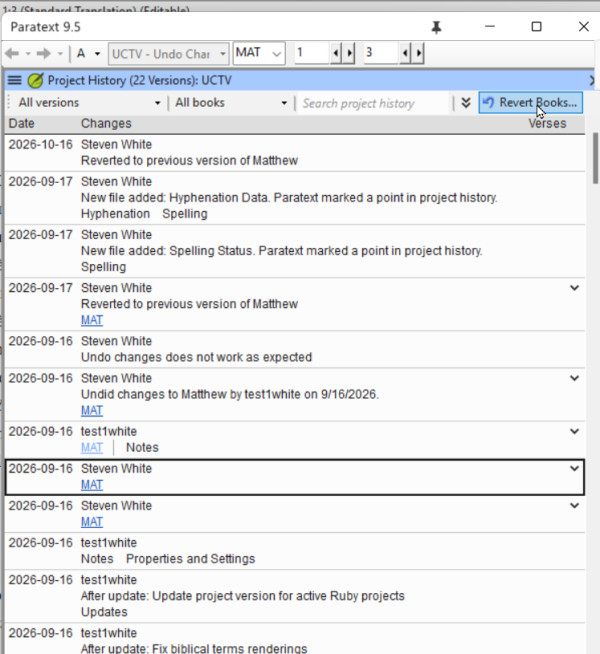
I have seen this happen. It turns out, that if the team member did not have the latest version of the book when the corruption took place, Undo changes does not roll back to the latest version, but to the version that user had on their computer. 
If a file gets corrupted and then sent, the admin should verify what version of the book or books they are going to get if they undo changes.

When you find in Recent Changes or Project History the point where the file was corrupted, click the link to open compare versions, and examine the right hand side. That is the version that Undo changes will roll back to. If that is not the latest version, look at other changes to that book, and when you find the latest good changes, use the Revert books command to bring that version back. 
image

Some general principles that also might help avoid this scenario.
1. If you have a systems crash and you detect something bad has happened to your Paratext project, DO NOT send receive the corrupted project.  Delete the project from your computer, then do  a send/receive to get the uncorrupted project from the server.

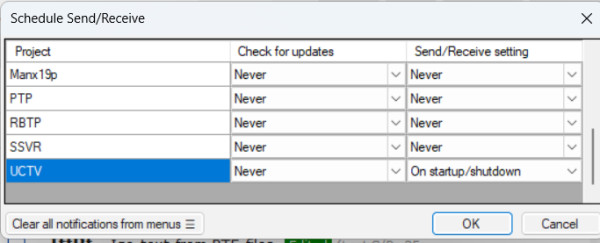
2) If you have a good and inexpensive Internet connection, always do send/receive before you start work in Paratext (to get the latest changes from your teammates) and send/receive when you finish work in Paratext.  You can make this automatic by scheduling your send/receive on startup and shutdown: This will decrease the possibility that Undo Changes would not bring back the latest version. 
image

पहले द्वारा [Expert]
(3.3k अंक)

संबंधित प्रश्न

0 वोट
0 उत्तर 220 व्यूज़
मैं RTL दस्तावेज़ में तालिका सेल में संख्याओं को प्रारंभिक अक्षरों के रूप में डालने में असमर्थ हूँ, जब तक कि मैं अवांछित मार्कर और ... [LTR] 456 \tr \tc1 [LTR]123 \tc2 [LTR]456
Kent Spielmann 1.8k पूछा गया फ़रवरी 3, 2022
Paratext में
0 वोट
2 उत्तर 976 व्यूज़
9.4 Beta में सुधारों में से एक इस प्रकार वर्णित है: सुधारा गया उद्धरण जाँच (quotation checking)। नया उद्धरण प्रकार (Quotation ... संदर्भों को क्रमशः "9.3" और "9.4" में बदला गया]
Iver Larsen 869 पूछा गया सितंबर 1, 2023
Paratext में
0 वोट
3 उत्तर 743 व्यूज़
मैं कस्टम टूल Insert crossreferences or footnotes का उपयोग करके प्रोजेक्ट में चित्रों के व्यंजनों (\fig \fig*) के ... ) में सम्मिलित करने का कोई बेहतर तरीका है? Paulus+Kieviet
Paulus Kieviet 517 पूछा गया जनवरी 25, 2023
0 वोट
3 उत्तर 561 व्यूज़
हाल ही में हुए Paratext परिचय कार्यशाला में, एक प्रतिभागी Wasta-Linux पर Paratext 8 का उपयोग कर रहे थे। चूंकि मुझे LInux ... को काम करने के लिए कुछ विशेष करना ज़रूरी है? धन्यवाद
MSEAIT_LT 478 पूछा गया दिसंबर 1, 2017
0 वोट
3 उत्तर 483 व्यूज़
I have run into a weird issue on a user's computer running PT 7.5 and was wondering if anybody else had ... | Papua New Guinea [Email Removed].pgmailto:[Email Removed].pg
SIL LSS PNG 411 पूछा गया सितंबर 6, 2017
Welcome to Support Bible, where you can ask questions and receive answers from other members of the community.
Every day they continued to meet together in the temple courts. They broke bread in their homes and ate together with glad and sincere hearts, praising God and enjoying the favor of all the people. And the Lord added to their number daily those who were being saved.
Acts 2:46-47
3,068 प्रश्न
6,029 उत्तर
5,698 टिप्पणियाँ
2,037 उपयोगकर्ता






