I have seen this happen. It turns out, that if the team member did not have the latest version of the book when the corruption took place, Undo changes does not roll back to the latest version, but to the version that user had on their computer.
If a file gets corrupted and then sent, the admin should verify what version of the book or books they are going to get if they undo changes.
When you find in Recent Changes or Project History the point where the file was corrupted, click the link to open compare versions, and examine the right hand side. That is the version that Undo changes will roll back to. If that is not the latest version, look at other changes to that book, and when you find the latest good changes, use the Revert books command to bring that version back.
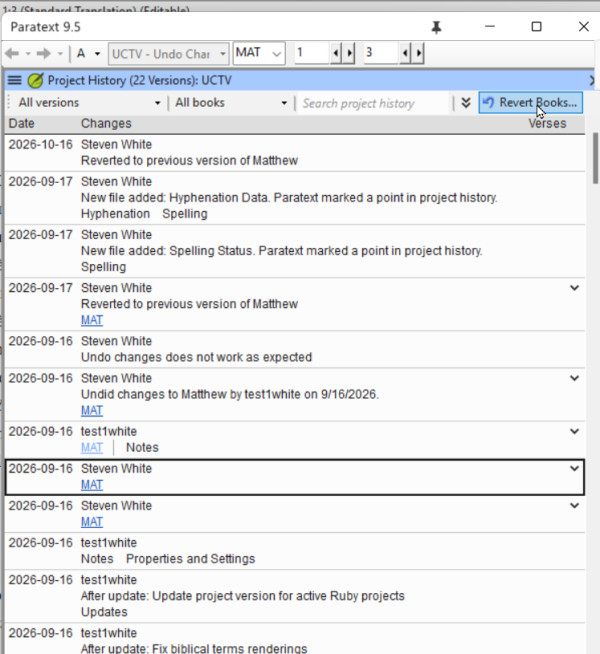
Some general principles that also might help avoid this scenario.
1. If you have a systems crash and you detect something bad has happened to your Paratext project, DO NOT send receive the corrupted project. Delete the project from your computer, then do a send/receive to get the uncorrupted project from the server.
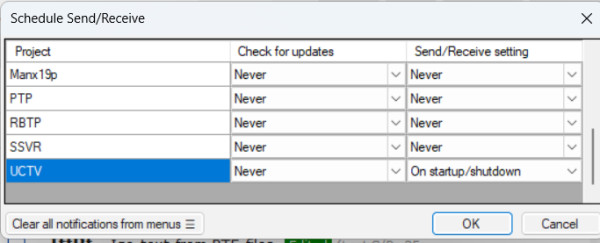
2) If you have a good and inexpensive Internet connection, always do send/receive before you start work in Paratext (to get the latest changes from your teammates) and send/receive when you finish work in Paratext. You can make this automatic by scheduling your send/receive on startup and shutdown: This will decrease the possibility that Undo Changes would not bring back the latest version.