0 votes
280 views

I recently updated PTXprint to version 3.0.41, and now I can't print PDF because of this error:

PTXprint [3.0.41] - Error!
Failed to create: ASLat_Default_JON_ptxp.pdf
! Font \idf@nt="Source Code Pro" at 8.0pt not loadable: Metric (TFM) file or installed font not found.
l.38 \font\idf@nt="Source Code Pro" at 8pt
------------------------------------------------------------------------------------------
Cannot find the Font specified. Install it, restart PTXprint and try again
or change the font to one that is already installed. More details below.

Font: 'Source Code Pro' was found in Style settings for marker(s): zpmkr

I've tried changing the font for `zpmkr` to Arial or any other generic fonts, but then the error changed to this:

PTXprint [3.0.41] - Error!
Failed to create: ASLat_Default_JON_ptxp.pdf
! Font \idf@nt="Source Code Pro" at 8.0pt not loadable: Metric (TFM) file or installed font not found.
l.38 \font\idf@nt="Source Code Pro" at 8pt
------------------------------------------------------------------------------------------
Cannot find the Font specified. Install it, restart PTXprint and try again
or change the font to one that is already installed. More details below.

Font: 'Source Code Pro' specified in Fonts+Scripts was not found

Now this is where it gets confusing. I'm using the default configuration that is Charis SIL, but somehow it thinks that Source Code Pro is being used here.
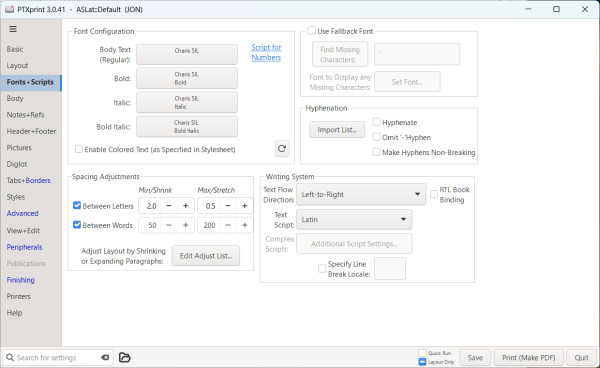
Any ideas?


PTXprint by (125 points) | 280 views

I've upgraded to 3.0.43, and the issue is still there. The warning gives more information though, but I still don't know what to do.

PTXprint [3.0.43] - Error!
Failed to create: ASLat_Default_JON_ptxp.pdf
! Font \idf@nt="Source Code Pro" at 8.0pt not loadable: Metric (TFM) file or installed font not found.
l.38 \font\idf@nt="Source Code Pro" at 8pt
I wasn't able to read the size data for this font,
so I will ignore the font specification.
[Wizards can fix TFM files using TFtoPL/PLtoTF.]
You might try inserting a different font spec;
e.g., type `I\font<same font id>=<substitute font name>'.
------------------------------------------------------------------------------------------
Cannot find the Font specified. Install it, restart PTXprint and try again
or change the font to one that is already installed. More details below.

Font: 'Source Code Pro' specified in Fonts+Scripts was not found

1 Answer

0 votes
That font should already be installed when PTXprint is set up. Could you check in C:\Program Files\PTXprint\fonts and see if you can locate SourceCodePro-Regular.ttf  Try (re-)installing it to see if it solves your issue. If not, we can dig deeper.
by (3.2k points)
Yes, the font is already installed on Windows. Also I can find the .ttf file in the directory you mentioned. I've tried uninstalling and reinstalling (install for all users) the font, but the issue persists.

Related questions

0 votes
2 answers 356 views
I'm new to PTXprint and maybe I tried something too difficult to start with. I'm wanting to create an Ajami (Arabic ... email my archive file to [Email Removed] for further help?
anon420410 102 asked Sep 3, 2022
0 votes
1 answer 464 views
Despite having the default Arial font selected in my Language Settings, that is not the font being used in ... currently does not differentiate between lowercase L and uppercase i
anon715303 111 asked Mar 30, 2023
0 votes
3 answers 379 views
I have created and installed a new font (Unicode, complex script, Khmer) to be used with my project. I can choose the ... ? I have no idea of what might be wrong. GB, anon015155
anon015155 153 asked Jan 22, 2020
0 votes
0 answers 179 views
A user has a project (ApalVB) that uses a legacy font. She reports that in the Parallel Passages and ... . Her internet bandwidth is extremely small, supporting only email.
anon895417 129 asked Oct 25, 2018
0 votes
3 answers 765 views
Am helping a user who pointed me out to this problem. In this example, when you search for the English term Messiah, you ... . Is there a setting we can change to make this work?
MSEAIT_LT 478 asked Oct 25, 2018
Welcome to Support Bible, where you can ask questions and receive answers from other members of the community.
Live in harmony with one another. Do not be proud, but be willing to associate with people of low position. Do not be conceited.
Romans 12:16
3,053 questions
6,013 answers
5,677 comments
2,032 users




