0 votes

I'm encountering two problems with diglot headers:

1. "Adjust Center Header Based on Column Widths" fails to do anything
My diglot setting are like this (with "Adjust Center Header" checked):
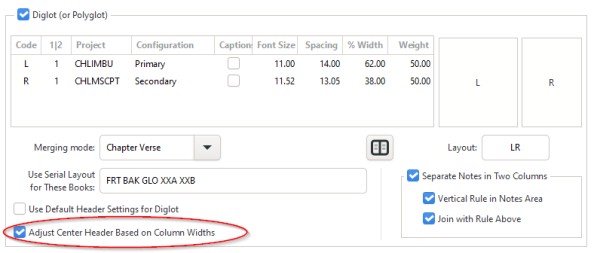
and yet the page numbers in the center header fail to be adjusted to line up with the gutter:

2. First/Last behavior is inconsistent

The secondary text is in the narrower, inner column, and the primary text is in the wider, outer column. The left page should show (for both columns) the reference of the first verse on the page, while the right page should show (for both columns) the reference of the last verse on the page. That is, between them both, the reader sees the full range on the spread.

My header settings are like this:
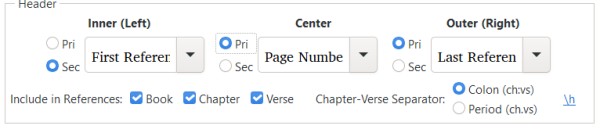
But what this results in is only 75% correct. As shown in earlier image, the left page correctly gets the first reference above each column, but the right-hand page gets the first reference of the inner column above the inner column, and the last reference of the outer column above the outer column.


 

PTXprint by (110 points)
edited by
If you saw this question earlier, the site glitched the first image (which had been pasted in), replacing it with one of the other images (which had been uploaded), making my report hard to follow. I've just corrected it.

2 Answers

0 votes
Best answer

1. I'm not sure what's up with the 'middle' marker not lining up... I've not changed anything on that front in years, but I'll have a look. Maybe there's some glitch in the python code.

2. Regarding the first/last header entries. Basically, PTXprint doesn't do spreads (yet), it does pages, so even if you got *almost* what you're asking for, it wouldn't be what you want, I think. What we can offer  (for a spread that RL|LR)  is this:
FirstR - page - FirstL | LastL - page - LastR  
 

So the left page gets first references and the right page gets last references.
To get that, you'd need to put this in your ptxprint-mods.tex file:

\HEADFOOTset{H}{}{\firstrefR}{\pagenumberL}{\firstrefL}{\lastrefL}{\pagenumberL}{\lastrefR}

The last 6 parameters are the contents of the header line, parameter 1 is whether you're setting the header {H} or footer {F} and parameter 2 is {} for normal pages {title} for title pages and {noV} for pages like glossary or intro matter, where there are no verses.
 

by (1.1k points)
selected by
Thanks so much!
Please let me know if you need any more info on the header alignment to gutter problem, or when a fix is available.
0 votes

Thanks for pointing out that the adjust center heading had stopped working. It has now been fixed and will be right from ver 3.0.11

Regarding the page header, you can set each of the four positions independently as shown here:

\def\RHevenleft{\firstrefR}
\def\RHevenright{\firstrefL}

\def\RHoddleft{\lastrefL}
\def\RHoddright{\lastrefR}

by (3.2k points)
Welcome to Support Bible, where you can ask questions and receive answers from other members of the community.
Live in harmony with one another. Do not be proud, but be willing to associate with people of low position. Do not be conceited.
Romans 12:16
3,032 questions
5,987 answers
5,653 comments
2,019 users





