0
339 次瀏覽

For a couple of years now, language projects preparing the script of the Jesus Film after having translated Luke and other Scripture portions have been able to use a tool that would extract the relevant Scripture passages mentioned in the script and paste them into notes within the script file. This tool uses a specialized version of the Paratext 6 and 7 “Extract Lectionary” tool that was available in the Advanced Checks menu. (The Jesus Film tool when installed is found in Checking > Advanced > Jesus Film > Verse Extract - JLOT Recording Script).

Programming changes in how Paratext 8 processes Python scripts mean these tools will not work in Paratext 8. I have tested a workaround using a Bible module and this does seem to work.

This is the process:

  1. Download the file “VerseExtract-JLOT_Recording_Script_mod.sfm” and place it inside the “_Modules” folder inside “My Paratext 8 Projects”.
    Link to the file
  2. Create a Bible module in your Paratext project, (Tools > Open Bible Module). Choose the above file as the specification.
  3. In Paratext, go to the module book you have created, and Save to RTF the resulting module. (File, Save as RTF).
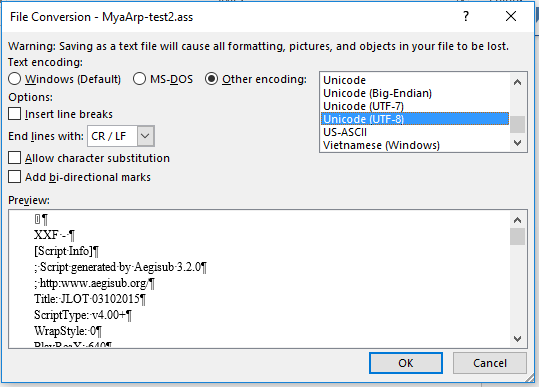
  4. In Word, open the RTF file, and save as a text file. If Word says some text will not save correctly in the current encoding, change the encoding to “Unicode (UTF-8)”
    image
  5. Copy or move the folder to the “Scripts” folder inside the Aegisub setup, and change the text file name so the last three letters end in “.ass” (the file extension expected by Aegisub)
  6. You can now start Aegisub and select this script file, and the script will have notes of all the relevant verses you have translated in Paratext.

Doug HIgby is also working on a module for the Jesus Film script, but that module has a different goal. That module is to guide teams that have not translated anything, to show them which passages they need to translate to have the relevant parts of the Scripture for the Jesus film. This module is to extract relevant passages that have already been translated into the script format.


舊文章 - 以原文顯示
Paratext [Expert]
(3.3k 點) 提出

已重新顯示 | 339 次瀏覽

3 個回答

+1
最佳回答

Technical note: the important thing needed for the text file is to preserve the existing line breaks and not add any new ones. I added \nb markers at each new line in the source text file to make the SFM file. I also changed the \ref codes from the original file to \refnp so no paragraph marks from the text get added. I also added reference codes so Paratext will put in the reference for each verse or group of verses, using the book names and abbreviations set up in the Scripture References section.

Paratext does put each \refnp at the beginning of a new line in the module, but when you save as RTF, these new lines go away, and so saving as a text file produces the desired output.

舊文章 - 以原文顯示
[Expert]
(3.3k 點) 提出
0

This is so cool! It also works in PT-Linux, both PT 7.x and 8, in which the "Advanced Checks" have not been available.

Thanks for working on this, sewhite (and others, perhaps).

  KimB
舊文章 - 以原文顯示
(673 點) 提出
已重新顯示
0

Is there something similar for the Luke film?

舊文章 - 以原文顯示
(448 點) 提出

About the Luke film, I do not know. For your information, the Jesus Film team has now created an EXE file that will find the text from Paratext and put it into the script file. Contact them for access. (If you’ve been given a link to download the latest copy of the script, this file is there as well).

舊文章 - 以原文顯示

相關問題

0
2 個回答 374 次瀏覽
鑑於各團隊開始使用 Glyssen 對新約文本進行預處理,以識別文本中的每位說話者,從而進行戲劇化錄音,我想知道是否值得順勢利用這項工作,在 Paratext 專案中自動標記耶穌的話語 \wj \wj* Glyssen 會生成一個包含所需數據 ... 方面更有天賦,能夠比我做得更好?如果這有幫助,我願意撰寫偽代碼 我也願意學習並與其他人合作處理此事
Mark P 3.2k 提出 已提問 8月 5, 2019
0
4 個回答 545 次瀏覽
當從 Paratext 將福音書的一部分匯出為 PDF 時,檔案中沒有顯示耶穌的紅字。匯出為 RTF 時可以正常顯示,但匯出為 PDF 時卻不行。
ace541611 123 提出 已提問 7月 7, 2021
0
0 個回答 188 次瀏覽
當我開啟文字集合(Text Collection)時,所有經文文字都是黑色的: image616 509 23.7 KB 但當我點擊其中一個資源(Resources)以在第二個窗格中顯示上下文時,耶穌的話語變成了彩色: 現在,當我關閉第二個窗格時,耶穌的 ... ,這些資源的所有文字都使用相同的字體和大小 太棒了!!這樣看起來真的很漂亮 開發人員們做得好!!
[Moderator]
james_post
2.1k 提出
已提問 3月 31, 2021
0
4 個回答 910 次瀏覽
EDIT: Paratext 8 Question: Someone wants to be able to turn off red lettering in the resources that have the words ... ? Is there anything similar to sewhite's Resource Font hack?
rowbory 510 提出 已提問 12月 4, 2017
0
1 個回答 285 次瀏覽
Our project uses the \wj marker for Words of Jesus and displays the text using the default (defined by usfm.sty) ... Any suggestions of how to do this would be greatly appreciated.
mnjames 1.9k 提出 已提問 11月 23, 2015
Welcome to Support Bible, where you can ask questions and receive answers from other members of the community.
There is neither Jew nor Gentile, neither slave nor free, nor is there male and female, for you are all one in Christ Jesus.
Galatians 3:28
3,049 個問題
6,007 個回答
5,672 則評論
2,029 位使用者




