0
338 次浏览

For a couple of years now, language projects preparing the script of the Jesus Film after having translated Luke and other Scripture portions have been able to use a tool that would extract the relevant Scripture passages mentioned in the script and paste them into notes within the script file. This tool uses a specialized version of the Paratext 6 and 7 “Extract Lectionary” tool that was available in the Advanced Checks menu. (The Jesus Film tool when installed is found in Checking > Advanced > Jesus Film > Verse Extract - JLOT Recording Script).

Programming changes in how Paratext 8 processes Python scripts mean these tools will not work in Paratext 8. I have tested a workaround using a Bible module and this does seem to work.

This is the process:

  1. Download the file “VerseExtract-JLOT_Recording_Script_mod.sfm” and place it inside the “_Modules” folder inside “My Paratext 8 Projects”.
    Link to the file
  2. Create a Bible module in your Paratext project, (Tools > Open Bible Module). Choose the above file as the specification.
  3. In Paratext, go to the module book you have created, and Save to RTF the resulting module. (File, Save as RTF).
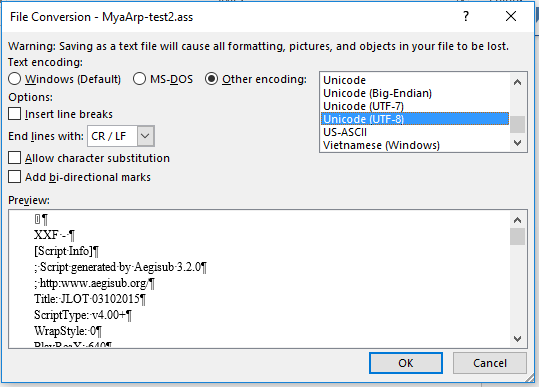
  4. In Word, open the RTF file, and save as a text file. If Word says some text will not save correctly in the current encoding, change the encoding to “Unicode (UTF-8)”
    image
  5. Copy or move the folder to the “Scripts” folder inside the Aegisub setup, and change the text file name so the last three letters end in “.ass” (the file extension expected by Aegisub)
  6. You can now start Aegisub and select this script file, and the script will have notes of all the relevant verses you have translated in Paratext.

Doug HIgby is also working on a module for the Jesus Film script, but that module has a different goal. That module is to guide teams that have not translated anything, to show them which passages they need to translate to have the relevant parts of the Scripture for the Jesus film. This module is to extract relevant passages that have already been translated into the script format.


较早的帖子 - 以原始语言显示
Paratext [Expert]
(3.3k 分) 发布

已重新显示 | 338 次浏览

3 个回答

+1
最佳答案

Technical note: the important thing needed for the text file is to preserve the existing line breaks and not add any new ones. I added \nb markers at each new line in the source text file to make the SFM file. I also changed the \ref codes from the original file to \refnp so no paragraph marks from the text get added. I also added reference codes so Paratext will put in the reference for each verse or group of verses, using the book names and abbreviations set up in the Scripture References section.

Paratext does put each \refnp at the beginning of a new line in the module, but when you save as RTF, these new lines go away, and so saving as a text file produces the desired output.

较早的帖子 - 以原始语言显示
[Expert]
(3.3k 分) 发布
0

This is so cool! It also works in PT-Linux, both PT 7.x and 8, in which the "Advanced Checks" have not been available.

Thanks for working on this, sewhite (and others, perhaps).

  KimB
较早的帖子 - 以原始语言显示
(673 分) 发布
已重新显示
0

Is there something similar for the Luke film?

较早的帖子 - 以原始语言显示
(448 分) 发布

About the Luke film, I do not know. For your information, the Jesus Film team has now created an EXE file that will find the text from Paratext and put it into the script file. Contact them for access. (If you’ve been given a link to download the latest copy of the script, this file is there as well).

较早的帖子 - 以原始语言显示

相关问题

0
2 个回答 374 次浏览
鉴于各团队开始使用 Glyssen 对新约文本进行预处理,以识别文本中的每位说话者用于戏剧化录音,我想知道是否值得借助这项工作,在 Paratext 项目中自动标记耶稣的话 \wj \wj* Glyssen 会生成一个包含所需数据的 Excel ... 编程,能够比我做得更好?如果有帮助的话,我愿意编写伪代码 我也愿意学习并与其他人合作处理这个问题
Mark P 3.2k 发布 提问于 八月 5, 2019
0
4 个回答 545 次浏览
当从 Paratext 将福音书的一部分导出为 PDF 时,耶稣的红字在文件中没有显示出来。导出为 RTF 时正常,但导出为 PDF 时不行。
ace541611 123 发布 提问于 七月 7, 2021
0
0 个回答 188 次浏览
当我打开一个文本集合时,所有经文文本都是黑色的: 图片616 509 23.7 KB 但是,当我点击其中一个资源以在第二个窗格中显示上下文时,耶稣的话语现在变成了彩色: 现在,当我关闭第二个窗格时,耶稣的话语仍然是彩色的: 图片616 ... 话语? 我还注意到,这些资源的所有文本都使用相同的字体和大小 太棒了!!这样看起来真的非常漂亮 开发人员做得好!!
[Moderator]
james_post
2.1k 发布
提问于 三月 31, 2021
0
4 个回答 910 次浏览
EDIT: Paratext 8 Question: Someone wants to be able to turn off red lettering in the resources that have the words ... ? Is there anything similar to sewhite's Resource Font hack?
rowbory 510 发布 提问于 十二月 4, 2017
0
1 个回答 285 次浏览
Our project uses the \wj marker for Words of Jesus and displays the text using the default (defined by usfm.sty) ... Any suggestions of how to do this would be greatly appreciated.
mnjames 1.9k 发布 提问于 十一月 23, 2015
Welcome to Support Bible, where you can ask questions and receive answers from other members of the community.
I appeal to you, brothers and sisters, in the name of our Lord Jesus Christ, that all of you agree with one another in what you say and that there be no divisions among you, but that you be perfectly united in mind and thought.
1 Corinthians 1:10
3,049 个问题
6,007 个回答
5,672 条评论
2,029 位用户




