0 голосов
338 просмотров

For a couple of years now, language projects preparing the script of the Jesus Film after having translated Luke and other Scripture portions have been able to use a tool that would extract the relevant Scripture passages mentioned in the script and paste them into notes within the script file. This tool uses a specialized version of the Paratext 6 and 7 “Extract Lectionary” tool that was available in the Advanced Checks menu. (The Jesus Film tool when installed is found in Checking > Advanced > Jesus Film > Verse Extract - JLOT Recording Script).

Programming changes in how Paratext 8 processes Python scripts mean these tools will not work in Paratext 8. I have tested a workaround using a Bible module and this does seem to work.

This is the process:

  1. Download the file “VerseExtract-JLOT_Recording_Script_mod.sfm” and place it inside the “_Modules” folder inside “My Paratext 8 Projects”.
    Link to the file
  2. Create a Bible module in your Paratext project, (Tools > Open Bible Module). Choose the above file as the specification.
  3. In Paratext, go to the module book you have created, and Save to RTF the resulting module. (File, Save as RTF).
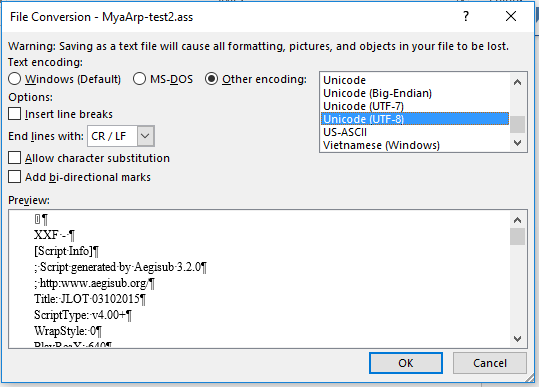
  4. In Word, open the RTF file, and save as a text file. If Word says some text will not save correctly in the current encoding, change the encoding to “Unicode (UTF-8)”
    image
  5. Copy or move the folder to the “Scripts” folder inside the Aegisub setup, and change the text file name so the last three letters end in “.ass” (the file extension expected by Aegisub)
  6. You can now start Aegisub and select this script file, and the script will have notes of all the relevant verses you have translated in Paratext.

Doug HIgby is also working on a module for the Jesus Film script, but that module has a different goal. That module is to guide teams that have not translated anything, to show them which passages they need to translate to have the relevant parts of the Scripture for the Jesus film. This module is to extract relevant passages that have already been translated into the script format.


Старое сообщение — показано на исходном языке
Paratext от [Expert]
(3,3тыс. очков)

снова показан | 338 просмотров

3 Ответов

+1 голос
Лучший ответ

Technical note: the important thing needed for the text file is to preserve the existing line breaks and not add any new ones. I added \nb markers at each new line in the source text file to make the SFM file. I also changed the \ref codes from the original file to \refnp so no paragraph marks from the text get added. I also added reference codes so Paratext will put in the reference for each verse or group of verses, using the book names and abbreviations set up in the Scripture References section.

Paratext does put each \refnp at the beginning of a new line in the module, but when you save as RTF, these new lines go away, and so saving as a text file produces the desired output.

Старое сообщение — показано на исходном языке
от [Expert]
(3,3тыс. очков)
0 голосов

This is so cool! It also works in PT-Linux, both PT 7.x and 8, in which the "Advanced Checks" have not been available.

Thanks for working on this, sewhite (and others, perhaps).

  KimB
Старое сообщение — показано на исходном языке
от (673 очков)
снова показан
0 голосов

Is there something similar for the Luke film?

Старое сообщение — показано на исходном языке
от (448 очков)

About the Luke film, I do not know. For your information, the Jesus Film team has now created an EXE file that will find the text from Paratext and put it into the script file. Contact them for access. (If you’ve been given a link to download the latest copy of the script, this file is there as well).

Старое сообщение — показано на исходном языке

Похожие вопросы

0 голосов
2 ответов 374 просмотров
Учитывая, что команды начинают использовать Glyssen для предварительной обработки своих текстов Нового Завета, чтобы определить каждого ... и работать с кем-то еще над этим
Mark P 3,2тыс. задал вопрос авг 5, 2019
0 голосов
4 ответов 545 просмотров
При экспорте части Евангелий из Paratext в PDF слова Иисуса, выделенные красным цветом, не отображаются в файле. При экспорте в RTF это работает, но не в PDF.
ace541611 123 задал вопрос июл 7, 2021
0 голосов
0 ответов 188 просмотров
Когда я открываю Text Collection, весь текст Писания чёрный: image616 509 23.7 KB Но когда я нажимаю на один ... УРА!! Так выглядит ПО-НАСТОЯЩЕМУ красиво. Молодцы, разработчики!!
[Moderator]
james_post
2,1тыс.
задал вопрос мар 31, 2021
0 голосов
4 ответов 910 просмотров
EDIT: Paratext 8 Question: Someone wants to be able to turn off red lettering in the resources that have the words ... ? Is there anything similar to sewhite's Resource Font hack?
rowbory 510 задал вопрос дек 4, 2017
0 голосов
1 ответ 285 просмотров
Our project uses the \wj marker for Words of Jesus and displays the text using the default (defined by usfm.sty) ... Any suggestions of how to do this would be greatly appreciated.
mnjames 1,9тыс. задал вопрос ноя 23, 2015
Welcome to Support Bible, where you can ask questions and receive answers from other members of the community.
Accept the one whose faith is weak, without quarreling over disputable matters.
Romans 14:1
3,049 вопросов
6,007 ответов
5,672 комментариев
2,029 пользователей




