您有嘗試調整這些樣式的「前間距/後間距」係數嗎?
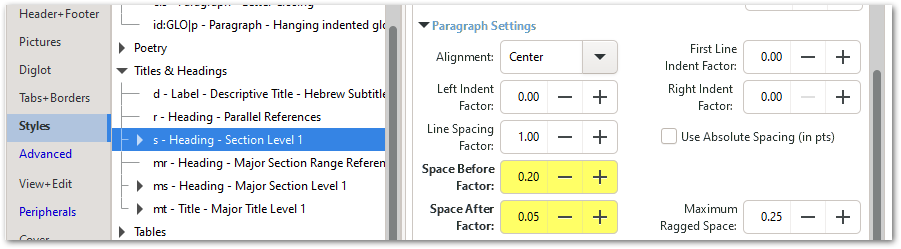
請注意,每個樣式都有「前」和「後」的「係數」,這些係數會與該樣式上方和下方樣式的對應值相加。另一個複雜之處在於,文字本身會鎖定在網格上,因此由於網格的存在,您在此輸入的值並不總是會產生您預期的結果。
您可能還想嘗試一個新功能(2.6 或更高版本),該功能允許文字脫離網格:
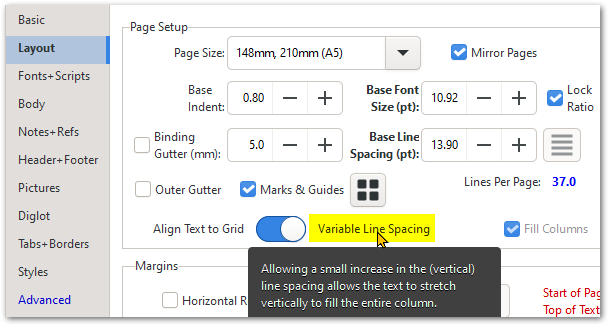
這允許對間距進行更精確的控制,但也會產生其他有趣的影響——且僅建議用於草稿列印或在較厚紙張上的短版印刷。請避免在薄聖經紙張和大批量生產中使用此功能。
Have you tried adjusting the Space Before/After factors for these styles?
Note that each style has both a before and after "factor", and these combine with (get added to) the corresponding values of the styles above and below the style in question. Another complication is that the text itself gets locked to the grid, so the values you enter here won't always produce the results you expect due to the grid.
You may want to also experiment with a new feature (2.6 or later) allowing the text to go off the grid:
This allows more control over the spacing, but has other interesting effects - and is only recommended for DRAFT printouts and short runs on thicker paper. Avoid using this feature for thin Bible paper and large production runs.
機器翻譯自 English








