dcb -
如果项目在 Paratext 中存在,通常更好的做法是从 Paratext 中删除它。在那里,您可以选择将其从何处移除(您的计算机、注册表、S/R 服务器,或它们的任意组合)。如果项目仍然注册并可通过 S/R 访问,我建议下载该项目,然后在 Paratext 内部选择“在所有位置删除”选项将其删除。
这一切取决于您在项目中的角色。我还建议查看谁也是该项目的成员(如果有的话),以便您可以通知他们该项目正在被删除。
在注册表中操作会稍微复杂一些。您应该在删除注册信息之前先从服务器删除项目。在项目的注册选项卡中,有“删除”和“取消链接”选项。“删除”选项会将项目从 S/R 服务器中移除。“取消链接”会删除 guid,但保留项目在注册表中。这两个选项都会显示关于将执行操作的警告。
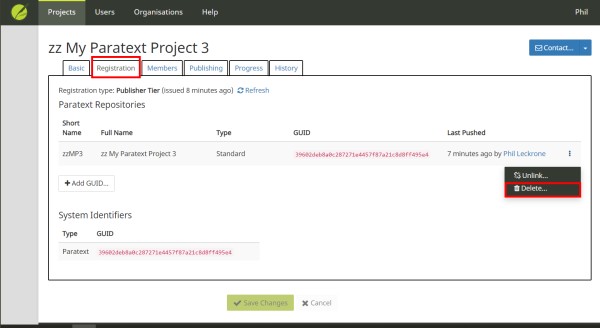
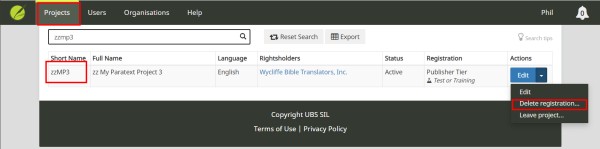
您可以从项目列表中删除注册信息:
dcb -
If the project exists in Paratext it is generally a better idea to delete it from Paratext. There you can choose where it should be removed from (your computer, the registry, the S/R serve, or any combination). If the project is still registered and availble through S/R, I would recommend downloading the project and then deleting it from within Paratext with the option to delete in all locations.
All of this depends upon your role in the project. I would also recommend reviewing who else is a member of the project (if anyone) so that you can notify them that the proejct is being deleted.
It is a bit more complicated in the registry. You should delete the project from the server before you delete the registration. Under the registration tab for the project there are options to delete and unlink. The delete option will remove the project from the S/R server. Unlink will delete the guid, but leave the project in the registry. Both options show warnings about what will be done.
You can delete the registration from the projects list:
机器翻译自 English








