dcb -
Если проект существует в Paratext, как правило, лучше удалить его из Paratext. Там вы можете выбрать, откуда именно он должен быть удален (с вашего компьютера, из реестра, с сервера S/R или в любом сочетании). Если проект все еще зарегистрирован и доступен через S/R, я бы рекомендовал скачать проект, а затем удалить его из Paratext с опцией удаления во всех местах.
Все это зависит от вашей роли в проекте. Я также рекомендую проверить, кто еще является участником проекта (если есть), чтобы вы могли уведомить их об удалении проекта.
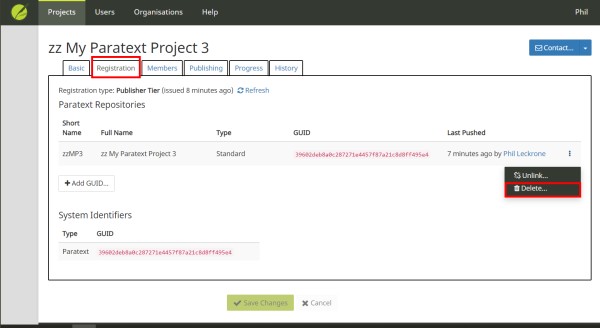
В реестре это немного сложнее. Вы должны удалить проект с сервера перед удалением регистрации. Во вкладке регистрации проекта есть опции для удаления и отсоединения. Опция удаления удалит проект с сервера S/R. Отсоединение удалит guid, но оставит проект в реестре. Обе опции показывают предупреждения о том, что будет сделано.
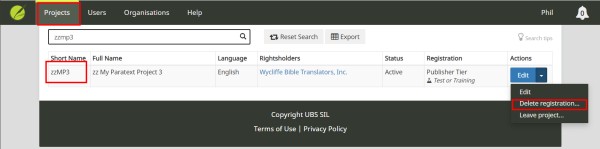
Вы можете удалить регистрацию из списка проектов:
dcb -
If the project exists in Paratext it is generally a better idea to delete it from Paratext. There you can choose where it should be removed from (your computer, the registry, the S/R serve, or any combination). If the project is still registered and availble through S/R, I would recommend downloading the project and then deleting it from within Paratext with the option to delete in all locations.
All of this depends upon your role in the project. I would also recommend reviewing who else is a member of the project (if anyone) so that you can notify them that the proejct is being deleted.
It is a bit more complicated in the registry. You should delete the project from the server before you delete the registration. Under the registration tab for the project there are options to delete and unlink. The delete option will remove the project from the S/R server. Unlink will delete the guid, but leave the project in the registry. Both options show warnings about what will be done.
You can delete the registration from the projects list:








