(See also Inserting Pages from a PDF which is more focussed on inserting a particular page or two, with the option of the added pages being scaled, rotated, etc and appearing with a running header.)
Let us assume that you want to PTXprint to insert every page of a PDF before the start of a particular book or at the end of a particular book.
What to do:
-
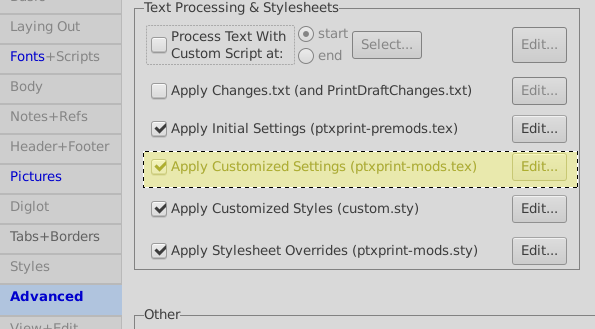
On the advanced tab, tick “Apply Customised Settings” and then edit it.
-
On an otherwise empty line in that file, type something like the following:
\setbookhook{start}{MAT}{\includepdf{../../../figures/FileName.pdf}}
Or, for the file to be after the end of the book of Revelation, this:
\setbookhook{end}{REV}{\pb \includepdf{../../../figures/FileName.pdf}}
- Click on Print to make sure that it is correct!
Now for some explanation.
At various points in processing the USFM, PTXprint checks to see if the user has asked for anything unusual to happen. You might like to think of those checks as a big grid of hooks on a wall, where almost all of them are empty. But, someone might put a list of instructions on a given one. If there is a list of instructions on the hook, then those instructions are added to the list of things that TeX should do before it does anything else.
The start and end of books is one place where the grid of hooks is checked, and the command \setbookhook puts its list of instructions on the specified hook (throwing away anything else that might already be there). Another place that hooks are checked for is the start of a verse (\setcvhook).
\setbookhook{start}{MAT}{\includepdf{filename.pdf}} tells the code that at the start of the book with \id MAT, it should process the instruction \includepdf{filename.pdf}.
In the example above, the instruction is including ../../../figures/FileName.pdf.
I’m using the unix-style forward slash between directories because (a) I’m typiing this on linux, (b) Windows programs can, I believe, normally cope with unix-style paths, and (c) I’d need to use \\ so that the backslash got through, and it then wouldn’t work on linux or Apple computers.
../../.. means three directories above ‘where we are now’, with ‘now’ being where TeX gets run from - for Default configuration, that’s .../PROJECT/local/ptxprint/Default and so the above is looking for the PDF in .../PROJECT/figures and by using a relative path rather than an absolute one, it ought to work on everyone’s computer.
Other things to note
- The
\pb used with the {end} version above forces a page break before the pages are added. Without it, then the PDF might be added before the last page of the book.
- While this does not add page numbers to pages, it does count pages.
- If you get the file path and name correct then you will get a message in the log file saying
includepdf ../../../figures/test.pdf pages=2
If you make a mistake, and there’s no file there, it will say pages=0 That is your only warning!
- There is also a special book
final (e.g. \setbookhook{end}{final}{...}) which is the last book of the job.
- While there is only one ‘hook’ at a particular point, multiple hooks can be used. e.g.:
- There are several differences between how input in
.tex files and .sfm (or USFM) files are handled. \includepdf is a TeX instruction, not USFM, and so cannot easily be used in USFM files, such as peripheries or front matter.
\includepdf is an immediate command which jumps over any queues. While most input adds material to TeX’s lists of text and paragraphs to get arranged on a page some time, \includepdf outputs the PDF’s pages as soon as it is encountered. - hence the need for the page-break command in the end-of-Revelation example. On the positive side, as it ignores the queue, it should not alter the arrangement of any paragraphs that it is met in.








