上週我在排版 1-2KI 時,PTXprint 幫我產出了一份草稿,但使用的是之前的扉頁 PDF,因為團隊當時還沒告訴我扉頁上要用的名稱。現在我已經拿到該資訊,產出了新的扉頁 PDF,並在 PTXprint 中選取了該 PDF,但現在列印時出現以下錯誤:
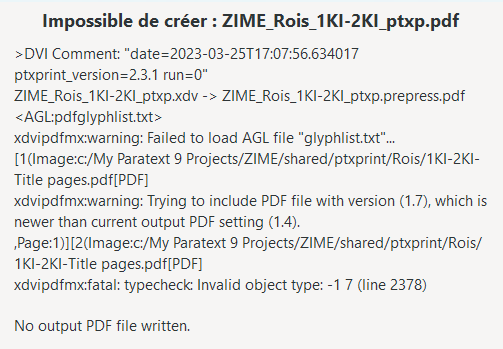
據我所知,我沒有更改任何設定,而上週時它還能正常運作。可能是我更新了 PTXprint 的版本。我目前使用的是 2.3.1。有什麼想法嗎?
我剛更新到 2.3.2,使用舊的扉頁 PDF 可以正常列印,但當我切換到新的扉頁 PDF 時,出現了相同的錯誤。
這讓我想起……之前我用 Word (2019) 的「匯出」功能建立 PDF 時,也遇到過一些奇怪的 PTXprint 錯誤。所以我嘗試使用「列印」功能,並將文件傳送至「Microsoft Print to PDF」。將該 PDF 放入專案的 shared\ptxprint 資料夾中,確認專案指向該檔案後……列印完全正常!
因此,如果您遇到奇怪的錯誤,且產生的 PDF 是透過 Word 匯出功能生成的,請嘗試使用其他方式產生 PDF 檔案。
Last week I was working on typesetting 1-2KI, and PTXprint produced a draft for me, but with a previous title pages PDF, because the team hadn’t yet told me the name they wanted on the title page. I’ve gotten that info now, produced the PDF of the title pages, selected that PDF in PTXprint, and now when I print, it gives me this error:
As far as I know, I haven’t changed anything in the settings from when it worked last week. It’s possible that I updated the version of PTXprint. I’m currently on 2.3.1. Any thoughts?
I just updated to 2.3.2, and I could print with the old title pages PDF, but when I switched to the new title pages PDF, I got the same error.
That reminded me… When I previous created a PDF with Word (2019) using the Export function, I got some strange PTXprint errors. So I tried creating the PDF using Print and sending the document to Microsoft Print to PDF. Put that PDF into the shared\ptxprint folder for the project, made sure the project was pointing to it and… it printed just fine!
So if you have weird errors and produced a PDF that is included with Word Export, then try another means of producing the PDF file.
機器翻譯自 English








