0 votes
186 views

Last week I was working on typesetting 1-2KI, and PTXprint produced a draft for me, but with a previous title pages PDF, because the team hadn’t yet told me the name they wanted on the title page. I’ve gotten that info now, produced the PDF of the title pages, selected that PDF in PTXprint, and now when I print, it gives me this error:
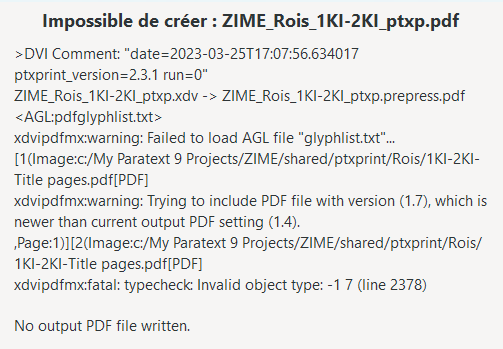
image

As far as I know, I haven’t changed anything in the settings from when it worked last week. It’s possible that I updated the version of PTXprint. I’m currently on 2.3.1. Any thoughts?

I just updated to 2.3.2, and I could print with the old title pages PDF, but when I switched to the new title pages PDF, I got the same error.

That reminded me… When I previous created a PDF with Word (2019) using the Export function, I got some strange PTXprint errors. So I tried creating the PDF using Print and sending the document to Microsoft Print to PDF. Put that PDF into the shared\ptxprint folder for the project, made sure the project was pointing to it and… it printed just fine!

So if you have weird errors and produced a PDF that is included with Word Export, then try another means of producing the PDF file.


PTXprint by (1.4k points) | 186 views

2 Answers

0 votes

It looks like that middle line is one of the most significant:
Trying to include PDF file with version 1.7 which is newer.....
Can you export as PDF1.4?

by (1.1k points)
0 votes

As I said, I’ve had this problem before of Word Export producing a file that PTXprint can’t handle. When I saw this before, Mark checked out the PDF file produced by Word Export with Adobe Acrobat, and found that it was mal-formed in some way.

There are a couple of options for the Export command, but not export as PDF1.4, as far as I can see. I do have a solution… print to the “Microsoft Print to PDF” printer. I just need to remember to use the option when I’m producing PDF files for PTXprint. And when I get around to trying out the new Cover Page functionality in PTXprint, I may not need to produce PDFs for PTXprint as much…

by (1.4k points)

A facetious answer would be to use LibreOffice. PDF generating programs are meant to call for the lowest version of the standard necessary to handle the PDF features being generated.

But I think there may be a way around this. I’ve created a version of ptxprint that takes a command line option -V 17 (or --pdfversion=17) to allow you to set the version of PDF that xdvipdfmx will generate (and therefore import. It won’t import a PDF version greater than the version it is generating).

Try this out in the next release (or interim) and let us know how it goes.

Related questions

0 votes
1 answer 18 views
I am using PTXprint 3.0.11 but haven't used it for a while so there are new features. I want to print select verses using the configuration I used previously. thanks!
MnKN 134 asked Feb 21
0 votes
4 answers 138 views
I'm trying to print a trial run of a single book (Gospel of John) with the Glossary entries contained in that ... various settings on the Advanced tab. PTXprint Version 2.4.21
aaron_wade 124 asked Jan 15, 2025
0 votes
2 answers 46 views
Sometimes I need to make changes to the AutoCorrect file (or create one) and I don't know how to do that. Is ... easy way to edit the AutoCorrect.txt file? One answer is below!
Phil_Leckrone 9.8k asked Jun 4
0 votes
2 answers 61 views
I am trying to set up an autocorrect.txt file in a Paratext 9.5 project. I have followed the instructions in the Paratext ... 't seem to be working at all. What could be wrong?
anon399461 123 asked May 8
0 votes
1 answer 11 views
My colleague is running the latest version of Paratext 9.5 also but cannot find the userMenu.txt file to add new ... default set of expressions in the User tab of RegEx Pal.
anon180868 195 asked Mar 18
Welcome to Support Bible, where you can ask questions and receive answers from other members of the community.
How good and pleasant it is when God’s people live together in unity!
Psalm 133:1
3,041 questions
5,999 answers
5,665 comments
2,023 users




