Minggu lalu saya sedang mengerjakan penataan huruf 1-2KI, dan PTXprint menghasilkan draf untuk saya, tetapi dengan PDF halaman judul sebelumnya, karena tim belum memberi tahu saya nama yang mereka inginkan di halaman judul. Sekarang saya sudah mendapat informasi tersebut, menghasilkan PDF halaman judul, memilih PDF tersebut di PTXprint, dan sekarang ketika saya mencetak, saya mendapat error ini:
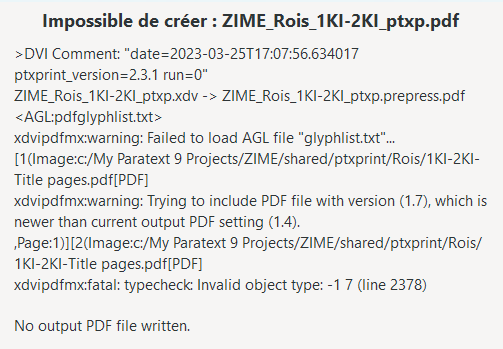
Sejauh yang saya tahu, saya tidak mengubah apa pun dalam pengaturan dari saat itu berhasil minggu lalu. Mungkin saya memperbarui versi PTXprint. Saat ini saya menggunakan 2.3.1. Ada pendapat?
Saya baru saja memperbarui ke 2.3.2, dan saya bisa mencetak dengan PDF halaman judul lama, tetapi ketika saya beralih ke PDF halaman judul baru, saya mendapat error yang sama.
Itu mengingatkan saya… Ketika saya sebelumnya membuat PDF dengan Word (2019) menggunakan fungsi Export, saya mendapat beberapa error PTXprint yang aneh. Jadi saya mencoba membuat PDF menggunakan Print dan mengirim dokumen ke Microsoft Print to PDF. Letakkan PDF tersebut di folder shared\ptxprint untuk proyek, pastikan proyek menunjuk ke sana dan… berhasil dicetak dengan baik!
Jadi jika Anda mendapat error aneh dan menghasilkan PDF yang disertakan dengan Word Export, cobalah cara lain untuk menghasilkan file PDF.
Last week I was working on typesetting 1-2KI, and PTXprint produced a draft for me, but with a previous title pages PDF, because the team hadn’t yet told me the name they wanted on the title page. I’ve gotten that info now, produced the PDF of the title pages, selected that PDF in PTXprint, and now when I print, it gives me this error:
As far as I know, I haven’t changed anything in the settings from when it worked last week. It’s possible that I updated the version of PTXprint. I’m currently on 2.3.1. Any thoughts?
I just updated to 2.3.2, and I could print with the old title pages PDF, but when I switched to the new title pages PDF, I got the same error.
That reminded me… When I previous created a PDF with Word (2019) using the Export function, I got some strange PTXprint errors. So I tried creating the PDF using Print and sending the document to Microsoft Print to PDF. Put that PDF into the shared\ptxprint folder for the project, made sure the project was pointing to it and… it printed just fine!
So if you have weird errors and produced a PDF that is included with Word Export, then try another means of producing the PDF file.
Diterjemahkan secara otomatis dari English








