एक Paratext उपयोगकर्ता ने पूछा है:
मैं PTXprint का उपयोग करके अरबी भाषा के Paratext प्रोजेक्ट से PDF बना रहा हूँ, जो एक दाएं-से-बाएं (right-to-left) भाषा है। PTXprint में यह विकल्प है:
“Marginal Verses … Col Width” (जो “Body” के अंतर्गत है)
यदि मैं इस विकल्प को सक्षम करता हूँ, तो निर्यातित PDF फ़ाइल में पद संख्याएं मार्जिन में प्रदर्शित होती हैं। हालाँकि, वे मार्जिन में बाईं ओर प्रदर्शित होती हैं, जबकि मैं उन्हें मार्जिन में दाईं ओर चाहता हूँ। मैं दाईं ओर के मार्जिन में पद संख्याएं कैसे प्रदर्शित करूँ?
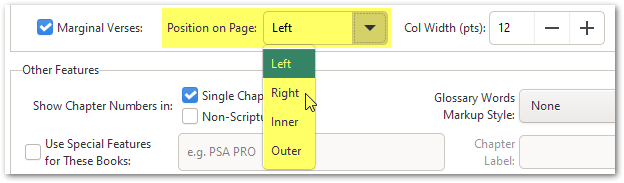
उत्तर सरल है: PTXprint की नवीनतम संस्करण में अपडेट करें, क्योंकि यह पिछले सप्ताह जोड़ा गया एक नया फीचर था:
A Paratext user has asked:
I’m using PTXprint to create PDFs from a Paratext project in the Arabic language, which is a right-to-left language. PTXprint has this option:
“Marginal Verses … Col Width” (under “Body”)
If I enable this option, the verse numbers are displayed in the margin in the exported PDF file. However, they are displayed in the margin on the left, whereas I would like them to be in the margin on the right. How do I display verse numbers in the margin to the right?
The answer is simple: Update to the latest version of PTXprint, as this was a new feature added in the last week:
English से मशीन-अनुवादित








