我剛在 PTX Print 和 LibreOffice Writer 中測試了多種字體。Writer 在我測試的每種字體中都能顯示小型大寫字母。維基百科指出,大多數文字處理軟體預設會忽略「真正的小型大寫字母」字形,而是透過縮小普通大写字母字形來模擬。我猜測 PTXprint 並未包含這種小型大寫字母的「模擬」技術。
在我的 PTXPrint 中,Andika New Basic 和 Gentium Basic 無法產生小型大寫字母,但 Andika 和 Gentium Plus 可以。Charis SIL 和 Charis SIL Compact 也都能「正常」顯示小型大寫字母。
如果 Charis 的小型大寫字母在您的 PTXPrint 中無法「正常」運作,我猜您可能需要更新您的 PTX Print 版本或 Charis SIL 字體版本,或者兩者都需要?很容易忘記大多數 SIL 軟體都會定期更新和改進。
我強烈懷疑 Tahoma 不包含小型大寫字母。請查看 Microsoft 關於 Tahoma 的規格,並與 Calibri 進行比較,網址為 docs.microsoft .com/en-us/typography/font-list
如果您有興趣,維基百科上有一個有趣的討論:請在那裡搜尋「small caps」。
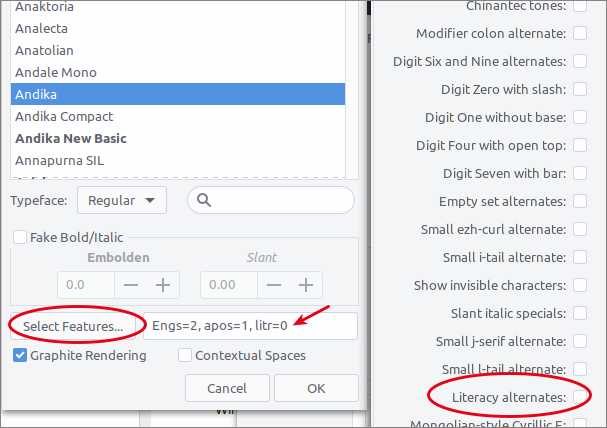
最後,如果您想要一款外觀良好的無襯線字體,可以試試 Andika。Andika 是作為識字字體開發的,因此預設為「primer a and g」。但您可以在 Paratext、PTXPrint、InDesign 和 LibreOffice 中將這些字形更改為「普通」的非識字變體。在 PTXPrint 的 Fonts+Script 選項卡中,點擊正文(Body Text)字體。選擇 Andika。然後勾選 Graphite Rendering,並點擊對話框底部的 Select Features 按鈕。對於 Andika 及其變體,功能「Literacy Alternates」預設為開啟狀態。取消勾選它,並在 Select Features 對話框中點擊 OK。您現在應該會在 Select Features 按鈕旁邊看到「litr-0」。正如截圖所示,我們也使用了 Eng 和 Glottal 變體。
I just tested a number of fonts in PTX Print and in LibreOffice Writer. Writer displays small caps in every font I tested. Wikipedia says most word processors ignore “true small caps” glyphs by default, instead they fake them by scaling down normal capital glyphs under the hood. I’m guessing PTXprint does not include this “fake” technique for small caps.
In my PTXPrint Andika New Basic and Gentium Basic do not produce small caps, but Andika and Gentium Plus do. Charis SIL and Charis SIL Compact also both “work” for small caps.
If small caps in Charis does not “work” for you in PTXPrint, I wonder if you might need to update either your PTX Print version or your Charis SIL font version, or maybe both? It’s easy to forget that most SIL software items are regularly updated and improved.
I strongly suspect that Tahoma does not include small caps. Check out Microsoft’s specs for Tahoma, compared with Calibri at docs.microsoft .com/en-us/typography/font-list
Interesting discussion on Wikipedia, if you are interested: Search for “small caps” there.
Finally, if you want a Sans font that looks good you might try Andika. Andika was developed as a literacy font so it defaults to “primer a and g.” But you can change these glyphs in Paratext, PTXPrint, InDesign & LibreOffice to the “normal” non-literacy variants. In the PTXPrint Fonts+Script tab click on the Body Text font. Choose Andika. Then tick Graphite Rendering and click the Select Features button at the bottom of the dialog. For Andika and its variations the feature, “Literacy Alternates” is ON by default. Untick it and click OK in the Select Features dialog. You should now see “litr-0” next to the Select Features button. We use Eng and Glottal variants as well, as you can see in the screenshot.
機器翻譯自 English








