Acabei de testar várias fontes no PTX Print e no LibreOffice Writer. O Writer exibe versais em todas as fontes que testei. A Wikipedia diz que a maioria dos processadores de texto ignora os glifos de “versais verdadeiros” por padrão, em vez disso, eles os falsificam reduzindo o tamanho dos glifos de maiúsculas normais por baixo dos panos. Estou supondo que o PTXprint não inclua essa técnica de “falsificação” para versais.
No meu PTXPrint, Andika New Basic e Gentium Basic não produzem versais, mas Andika e Gentium Plus produzem. Charis SIL e Charis SIL Compact também ambos “funcionam” para versais.
Se os versais em Charis não “funcionarem” para você no PTXPrint, me pergunto se você pode precisar atualizar sua versão do PTX Print ou sua versão da fonte Charis SIL, ou talvez ambas? É fácil esquecer que a maioria dos itens de software da SIL é regularmente atualizada e melhorada.
Eu suspeito fortemente que a Tahoma não inclui versais. Verifique as especificações da Microsoft para a Tahoma, comparadas com a Calibri em docs.microsoft .com/en-us/typography/font-list
Discussão interessante na Wikipedia, se você estiver interessado: Pesquise por “small caps” lá.
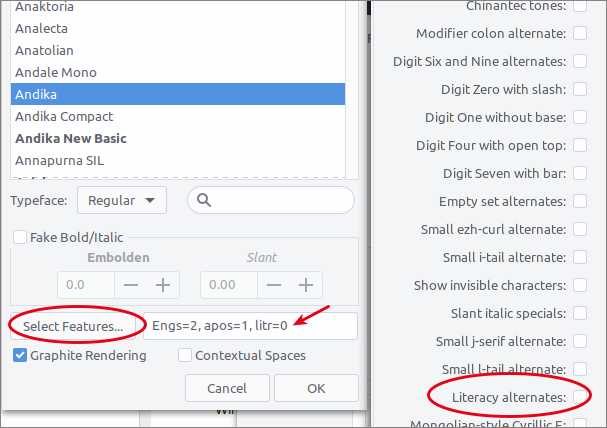
Finalmente, se você quiser uma fonte Sans que tenha boa aparência, você pode tentar Andika. Andika foi desenvolvido como uma fonte de alfabetização, então ela usa por padrão “a e g de alfabetização”. Mas você pode alterar esses glifos no Paratext, PTXPrint, InDesign & LibreOffice para as variantes “normais” não de alfabetização. Na aba Fonts+Script do PTXPrint, clique na fonte do Texto do Corpo. Escolha Andika. Então marque Graphite Rendering e clique no botão Select Features na parte inferior da caixa de diálogo. Para Andika e suas variações, o recurso “Literacy Alternates” está LIGADO por padrão. Desmarque-o e clique em OK na caixa de diálogo Select Features. Você deve agora ver “litr-0” ao lado do botão Select Features. Nós também usamos variantes Eng e Glottal, como você pode ver no screenshot.
I just tested a number of fonts in PTX Print and in LibreOffice Writer. Writer displays small caps in every font I tested. Wikipedia says most word processors ignore “true small caps” glyphs by default, instead they fake them by scaling down normal capital glyphs under the hood. I’m guessing PTXprint does not include this “fake” technique for small caps.
In my PTXPrint Andika New Basic and Gentium Basic do not produce small caps, but Andika and Gentium Plus do. Charis SIL and Charis SIL Compact also both “work” for small caps.
If small caps in Charis does not “work” for you in PTXPrint, I wonder if you might need to update either your PTX Print version or your Charis SIL font version, or maybe both? It’s easy to forget that most SIL software items are regularly updated and improved.
I strongly suspect that Tahoma does not include small caps. Check out Microsoft’s specs for Tahoma, compared with Calibri at docs.microsoft .com/en-us/typography/font-list
Interesting discussion on Wikipedia, if you are interested: Search for “small caps” there.
Finally, if you want a Sans font that looks good you might try Andika. Andika was developed as a literacy font so it defaults to “primer a and g.” But you can change these glyphs in Paratext, PTXPrint, InDesign & LibreOffice to the “normal” non-literacy variants. In the PTXPrint Fonts+Script tab click on the Body Text font. Choose Andika. Then tick Graphite Rendering and click the Select Features button at the bottom of the dialog. For Andika and its variations the feature, “Literacy Alternates” is ON by default. Untick it and click OK in the Select Features dialog. You should now see “litr-0” next to the Select Features button. We use Eng and Glottal variants as well, as you can see in the screenshot.








