0 votes
332 views

I used to go through Paratext PDF export to print booklets of scripture portions, using the Arial font. I am trying to switch to PTX Print but I get problems when I use Arial. The font is distorted, too narrow. Other fonts I tried didn’t cause problem. But in order to get the same look as the previous series I need it to work with Arial. Anyone having that problem?

PTXprint by (116 points) | 332 views

7 Answers

+1 vote

Hi Andre, Welcome to the community!
I’m one of the developers and am trying to work out what might be happening. In earlier versions we used to have people unable to locate the fonts they wanted because they weren’t properly installed (see 2nd question in this FAQ). I doubt that you are facing that particular issue (as you are able to see and select the Arial font), but wonder if it might be possible that there are 2 different Arial fonts installed - one in Windows\Fonts and another in “C:\Users<username>\AppData\Local\Microsoft\Windows\Fonts”. Could you please check that to ensure that isn’t the case. The only location that PTXprint uses (unlike some other software) is the Windows/Fonts folder.

If everything looks right there, then please check that you have some reasonable values in these settings, or turn off the adjustments to see if that improves things:

Am I right in assuming you are using the Roman script?

by (3.2k points)

Thank you for your quick reply ! There is no duplicate Arial font under AppData, and spacing adjustments are turned off. I am using Roman script. Here is a screenshot to help see the problem:

+1 vote

Thanks - that really helps to see it visually, and I agree that something’s wrong…
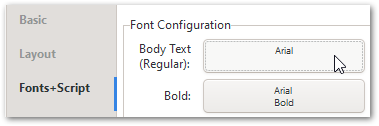
When you click on the Font button,
image
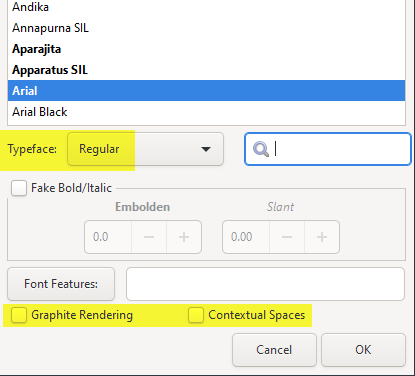
Do you see all the default values set (or is there something strange going on there)?
image

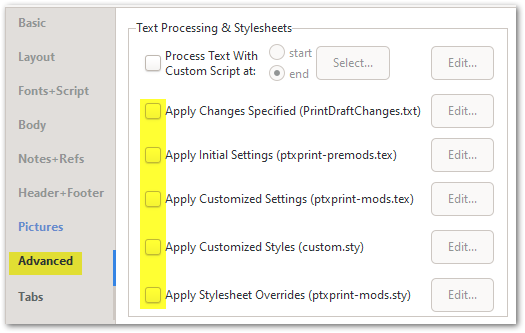
And finally I would turn off any additional .sty or .tex files that might be checked on the Advanced tab:
image

If you’re still getting compressed text, then it would help to have a sample project (with 1 small book selected) to work with. Use the Create ZIP Archive… button on the Advanced tab, and then send the resulting file to ptxprint[underscore][Email Removed] It would probably also help to check the option “Archive temporary files, for debugging” before you create the archive.


by (3.2k points)

Thanks - all those options where at default value / unchecked. I’ll send you the .zip file by email.

We’re still scratching our heads about why this might happen. But there were a bunch of smaller bugs that got fixed in 1.5.9. Would you please download the latest version, test again and see if by chance this has been resolved.

0 votes

Installed 1.5.9 : same problem.
Tried it on a coworker’s computer : same problem.
Is there a way we can tweak the font’s width using a stylesheet?

by (116 points)
reshown
0 votes

OK - let’s keep plodding until we find it…

Do you have any fonts stored in your project’s shared\ptxprint folder or sub-folders? If so, could you delete them, then re-start PTXprint and try again.

What do you see when you click on the Body Text (Regular) font?

And AFTER printing, could you look at the .tex file to see what fontnames are being used (around line 66-69):
image

That will probably be different on your computer, but it would be helpful to see where it is pulling those fonts from.

by (3.2k points)
0 votes
  1. no fonts stored in my projects shared\ptxprint
  2. here’s what I get when I click on the Body Text font:
  3. And here are the requested lines in the .tex file:
    (I can only put one image per post so I’ll just paste text here)

    %%%%% Fonts %%%%%
    \FontSizeUnit=1.000pt
    %% Faces
    \def\regular{“[C:/windows/fonts/ARIALN.TTF]:”}
    \def\bold{“[C:/windows/fonts/ARIALNB.TTF]:”}
    \def\italic{“[C:/windows/fonts/ariali.ttf]:”}
    \def\bolditalic{“[C:/windows/fonts/arialbi.ttf]:”}
    %\def\SpaceStretchFactor{1.0}
    %\def\SpaceShrinkFactor{0.5}
    \ColorFontsfalse*

Well it looks like we’re making some progress here? ArialN is Arial Narrow … so for some reason when I tell it to use Arial then it selects Arial Narrow ? (Note: the file arial.ttf is present in the same folder. For some reason PTXprint selects ArialN.ttf instead. Chances are the bug happens whenever Arial Narrow is installed?)

by (116 points)
reshown
0 votes

We’ll try to work out why this is failing, but in the mean time, a workaround would be to delete (or uninstall) the ArialN and ArialNB fonts from your system to see if it works as expected. Alternatively, try this on another machine that doesn’t have these extra fonts installed.

by (3.2k points)
0 votes

I’ve uninstalled all the ArialN* fonts and it does fix my problem. Thanks for your support!

by (116 points)

Related questions

0 votes
1 answer 27 views
This is my problem: In the footnote, the translator provides the Hebrew word in source text and its range of meaning. The ... the size of the main font. How to solve this problem?
Y Mdu Niê 124 asked Mar 10
0 votes
1 answer 52 views
Some colleagues have a problem making a PDF file. I have reproduced the problem, with a copy of their project, and ... problem? Error message: Font file is in c:\windows\fonts
[Expert]
sewhite
3.3k
asked Jan 28, 2025
0 votes
2 answers 218 views
I'm preparing a text using the Noto Nastiliq Urdu font. But I need to use a Roman font in the changes.txt edit screen ... font, but PTXprint hung up when I tried to print. Advice?
mlucas53 148 asked Jul 22, 2024
0 votes
1 answer 230 views
I'm preparing an NT using the Noto Nastaliq Urdu font. I'm having difficulty getting the spacing ... string of characters without any discernible word separation. Suggestions?
mlucas53 148 asked Dec 19, 2023
0 votes
2 answers 274 views
I'm new to PTXprint and maybe I tried something too difficult to start with. I'm wanting to create an Ajami (Arabic ... email my archive file to [Email Removed] for further help?
anon420410 102 asked Sep 3, 2022
Welcome to Support Bible, where you can ask questions and receive answers from other members of the community.
May the God who gives endurance and encouragement give you the same attitude of mind toward each other that Christ Jesus had.
Romans 15:5
3,037 questions
5,994 answers
5,661 comments
2,022 users





