謝謝——這真的有助於視覺化問題,我也同意那裡有些不对劲…
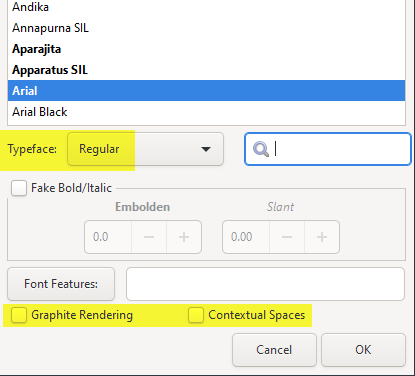
當你點擊字型(Font)按鈕時,
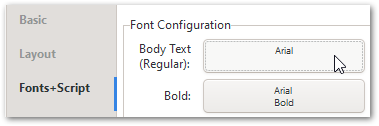
你看到所有預設值都已設定嗎(還是那裡有什麼奇怪的狀況)?
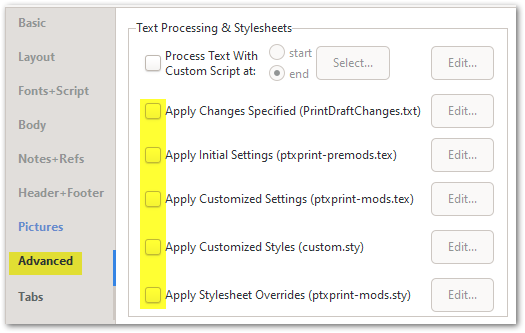
最後,我會建議關閉進階(Advanced)標籤頁中可能已勾選的任何額外 .sty 或 .tex 檔案:
如果你仍然得到壓縮的文字,那麼提供一個範例專案(選取一本小書)來進行測試會很有幫助。使用進階(Advanced)標籤頁上的 建立 ZIP 存檔…(Create ZIP Archive…) 按鈕,然後將產生的檔案傳送至 ptxprint[underscore][Email Removed] 在建立存檔之前,勾選「存檔暫存檔案,以便除錯(Archive temporary files, for debugging)」選項可能也會有幫助。
Thanks - that really helps to see it visually, and I agree that something’s wrong…
When you click on the Font button,
Do you see all the default values set (or is there something strange going on there)?
And finally I would turn off any additional .sty or .tex files that might be checked on the Advanced tab:
If you’re still getting compressed text, then it would help to have a sample project (with 1 small book selected) to work with. Use the Create ZIP Archive… button on the Advanced tab, and then send the resulting file to ptxprint[underscore][Email Removed] It would probably also help to check the option “Archive temporary files, for debugging” before you create the archive.
機器翻譯自 English








