धन्यवाद - यह इसे दृश्य रूप से देखने में वास्तव में मदद करता है, और मैं सहमत हूँ कि कुछ गलत है…
जब आप Font बटन पर क्लिक करते हैं,
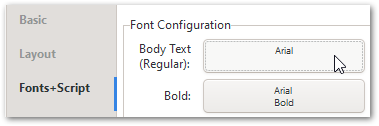
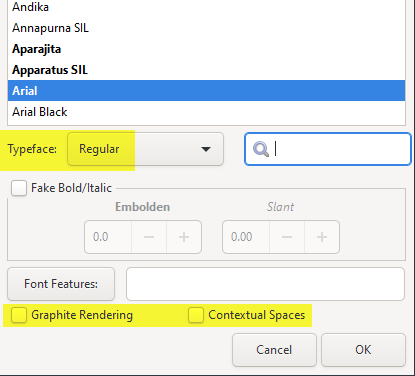
क्या आपको सभी डिफ़ॉल्ट मान सेट किए हुए दिखाई देते हैं (या वहां कुछ अजीब हो रहा है)?
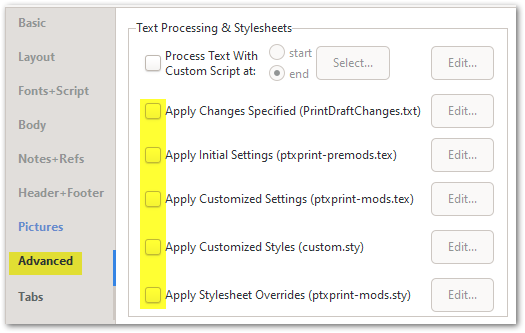
और अंत में, मैं Advanced टैब पर जांचे गए हो सकते हैं किसी भी अतिरिक्त .sty या .tex फ़ाइलों को बंद कर दूंगा:
यदि आप अभी भी संपीड़ित टेक्स्ट प्राप्त कर रहे हैं, तो काम करने के लिए एक नमूना प्रोजेक्ट (1 छोटी पुस्तक चयनित के साथ) की मदद होगी। Advanced टैब पर Create ZIP Archive… बटन का उपयोग करें, और फिर परिणामी फ़ाइल को ptxprint[underscore][Email Removed] पर भेजें। संभवतः आर्काइव बनाने से पहले “Archive temporary files, for debugging” विकल्प की जांच करने में भी मदद मिलेगी।
Thanks - that really helps to see it visually, and I agree that something’s wrong…
When you click on the Font button,
Do you see all the default values set (or is there something strange going on there)?
And finally I would turn off any additional .sty or .tex files that might be checked on the Advanced tab:
If you’re still getting compressed text, then it would help to have a sample project (with 1 small book selected) to work with. Use the Create ZIP Archive… button on the Advanced tab, and then send the resulting file to ptxprint[underscore][Email Removed] It would probably also help to check the option “Archive temporary files, for debugging” before you create the archive.
English से मशीन-अनुवादित








