是的……我輸入的方式是正確的。我輸入開頭標記(\k),然後輸入所需的文字,然後再次輸入 \k。此時,\k* 標記應該被高亮顯示,我應該只需要按 Enter 鍵。但大多數時候,我得到的是以下結果:
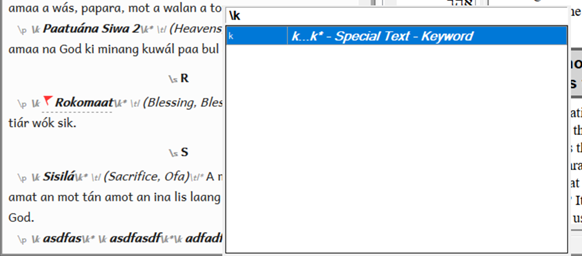
如果我在這個時候按 Enter,它只會插入 \k 開頭標記,而不是 \k* 結尾標記。
如果我在文字後面只輸入 \ 而不帶 k",它確實會給我 \k* 選項,但它是列表中的第 5 或第 6 個選項。我可以用滑鼠選取它,但我不能只按 Enter。
我確實有一個 custom.sty 檔案,但據我所知,它似乎不是導致這個問題的原因。這是 .ty 檔案中的內容
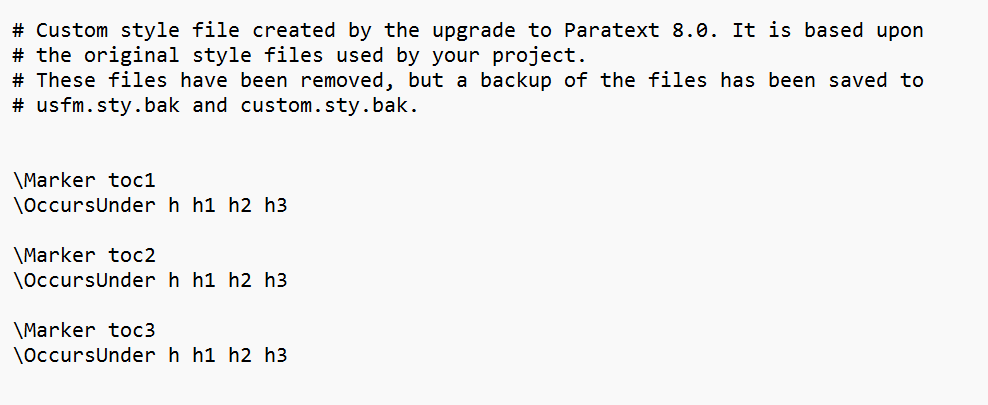
image988×405 7.99 KB
有什麼想法嗎???
謝謝
Yeah…I’m typing it the correct way. I enter the opening marker (\k) then I type in the desired text, then I type the \k again. At this point, the \k* marker should be highlighted and I should be able to just hit enter. But most of the time I get the following:
If i hit enter at this point it just inserts the \k opening marker and not the \k* ending marker.
If I just type the \ without the k" after the text then it does give me the \k* option, but it’s the 5th or 6th option down on the list. i can select it with my mouse, but i can’t just hit enter.
I do have a custom.sty file, but it doesn’t seem to be causing the issue as far as i can tell. This is what is in the .ty file
image988×405 7.99 KB
Any thoughts???
Thanks
機器翻譯自 English








