你好 anon421222,
感謝您提供這些資訊!就我所知,我的專案已經設定為 Unicode 和
組合字元(Composed Characters)(請參閱下方的截圖)!左邊是「轉換專案」(Convert Project)對話方塊,其中並未
顯示「組合字元」的選項。但右邊的「專案屬性」(Project Properties)似乎顯示該
專案已設定為 Unicode(即顯示 Unicode 且按鈕為停用狀態)以及組合字元?
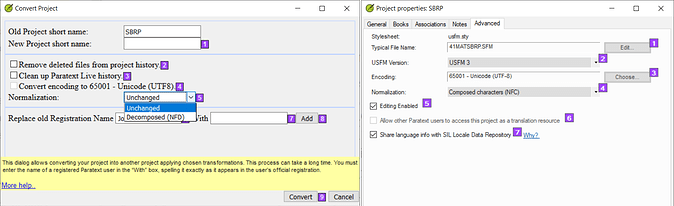
image.png1605×492 136 KB
PTXPrint 的某人建議我查看 XeTeX 日誌的結尾,按照他們的建議,我發現了
以下內容:
Missing character: There is no ꞌ (U+A78C) in font MarkTNR Satere! > ꞌ = U+0027
Missing character: There is no ỹ (U+1EF9) in font MarkTNR Satere! > ỹ = U+00FF
Missing character: There is no ẽ (U+1EBD) in font MarkTNR Satere! > ẽ = U+00E6
Missing character: There is no ĩ (U+0129) in font MarkTNR Satere! > ĩ = U+00F0
Satere-Mawe(SAT)語言使用鼻化元音、鼻化 y 以及直撇號(straight apostrophe)來表示喉塞音。
MarkTNR Satere 是我使用的字型,但缺失字元的 Unicode 編號與我使用的字型中的同一字元
不同(即 > 符號之後的編號)。
因此,當我使用 PTXPrint 列印時出現的矩形未識別字元符號,就是上述的
缺失字元。不知為何,Paratext 中的輸入似乎沒有使用 MarkTNR Satere 字型,儘管這
正是專案中設定的字型?
有幾個人建議,專案可以透過某種方式進行轉換,這樣我 anon421222 就不需要使用特殊
字型了。但沒有人實際解釋過如何做到這一點?我願意付出努力,但我 anon421222 不知道該做什麼!我
曾嘗試研究專案轉換,但它顯然已經設定為 Unicode 和組合字元?
以下是我使用 PTXPrint 列印為 PDF 時出現的錯誤截圖。利未記中缺失的字元似乎是
喉塞音,但在其他書卷中,則是鼻化元音未被識別?
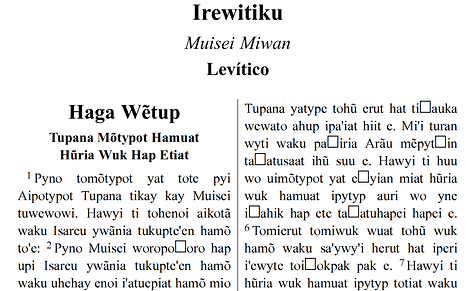
image.png1298×800 122 KB
非常感謝您的幫助!願上帝祝福您!
anon165192
Hi anon421222,
Thank you for that information! As far as I can tell my project is already configured as unicode and
Composed Characters (see screenshot below)! On the left is the Convert Project dialog which doesn’t
show the option for Composed Characters. But on the right the Project Properties appear to show that
the project is configured as unicode (i.e. unicode appears and button is disabled) and Composed Characters?
image.png1605×492 136 KB
Someone from PTXPrint told me to look at the end of the XeTeX Log and as per their suggestion I found the
following:
Missing character: There is no ꞌ (U+A78C) in font MarkTNR Satere! > ꞌ = U+0027
Missing character: There is no ỹ (U+1EF9) in font MarkTNR Satere! > ỹ = U+00FF
Missing character: There is no ẽ (U+1EBD) in font MarkTNR Satere! > ẽ = U+00E6
Missing character: There is no ĩ (U+0129) in font MarkTNR Satere! > ĩ = U+00F0
The Satere-Mawe (SAT) language uses nasalized vowels, nasalized y and the straight apostrophe for the glottal.
MarkTNR Satere is the font I use, but the missing character’s unicode number is different from the same character
in the font I use (i.e. after the > symbol).
Therefore, the retangular unrecognized character symbols which appear when I print using PTXPrint are the missing
characters above. Somehow the input in Paratext appears not to be using the MarkTNR Satere font although this is
the font which is configured in the project?
A couple of people have suggested that the project can be converted in some way so that I anon421222’t need to use a special
font. But no one has actually explained how to achieve this? I’m willing to do the work, but I anon421222’t know what to do! I
have tried looking into converting the project, but it apparently is already configured for unicode and Composed Characters?
Below is a screenshot of the error I get when using PTXPrint to print to PDF. The missing characters in Leviticus appear to be
the glottal, but in other books it is the nasalized vowels which are not being recognized?
image.png1298×800 122 KB
Your help is greatly appreciated! God bless!
anon165192
機器翻譯自 English








