Bonjour anon421222,
Merci pour ces informations ! À ma connaissance, mon projet est déjà configuré en Unicode et
Caractères composés (voir la capture d'écran ci-dessous) ! À gauche se trouve la boîte de dialogue Convertir le projet qui n'affiche
pas l'option Caractères composés. Mais à droite, les Propriétés du projet semblent indiquer que
le projet est configuré en Unicode (c'est-à-dire que Unicode apparaît et que le bouton est désactivé) et Caractères composés ?
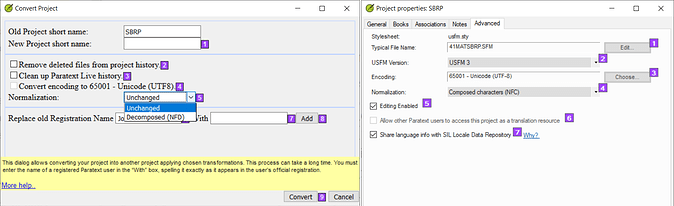
image.png1605×492 136 KB
Quelqu'un de PTXPrint m'a dit de regarder la fin du journal XeTeX et, conformément à leur suggestion, j'ai trouvé
ce qui suit :
Missing character: There is no ꞌ (U+A78C) in font MarkTNR Satere! > ꞌ = U+0027
Missing character: There is no ỹ (U+1EF9) in font MarkTNR Satere! > ỹ = U+00FF
Missing character: There is no ẽ (U+1EBD) in font MarkTNR Satere! > ẽ = U+00E6
Missing character: There is no ĩ (U+0129) in font MarkTNR Satere! > ĩ = U+00F0
La langue Satere-Mawe (SAT) utilise des voyelles nasales, un y nasal et l'apostrophe droite pour la glottale.
MarkTNR Satere est la police que j'utilise, mais le numéro Unicode du caractère manquant est différent de celui du même caractère
dans la police que j'utilise (c'est-à-dire après le symbole >).
Par conséquent, les symboles rectangulaires de caractères non reconnus qui apparaissent lorsque j'imprime en utilisant PTXPrint sont les caractères
manquants ci-dessus. D'une manière ou d'une autre, la saisie dans Paratext semble ne pas utiliser la police MarkTNR Satere bien que ce soit
la police configurée dans le projet ?
Quelques personnes ont suggéré que le projet peut être converti d'une certaine manière pour que je n'aie plus anon421222 besoin d'utiliser une police
spéciale. Mais personne n'a réellement expliqué comment y parvenir ? Je suis prêt à faire le travail, mais je ne sais pas anon421222 quoi faire ! J'ai
essayé de chercher comment convertir le projet, mais il semble déjà être configuré pour Unicode et Caractères composés ?
Ci-dessous se trouve une capture d'écran de l'erreur que j'obtiens lorsque j'utilise PTXPrint pour imprimer en PDF. Les caractères manquants dans le Lévitique semblent être
la glottale, mais dans d'autres livres, ce sont les voyelles nasales qui ne sont pas reconnues ?
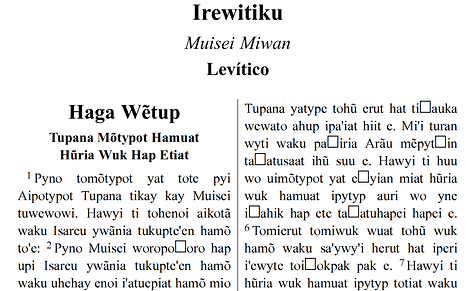
image.png1298×800 122 KB
Votre aide est très appréciée ! Que Dieu vous bénisse !
anon165192
Hi anon421222,
Thank you for that information! As far as I can tell my project is already configured as unicode and
Composed Characters (see screenshot below)! On the left is the Convert Project dialog which doesn’t
show the option for Composed Characters. But on the right the Project Properties appear to show that
the project is configured as unicode (i.e. unicode appears and button is disabled) and Composed Characters?
image.png1605×492 136 KB
Someone from PTXPrint told me to look at the end of the XeTeX Log and as per their suggestion I found the
following:
Missing character: There is no ꞌ (U+A78C) in font MarkTNR Satere! > ꞌ = U+0027
Missing character: There is no ỹ (U+1EF9) in font MarkTNR Satere! > ỹ = U+00FF
Missing character: There is no ẽ (U+1EBD) in font MarkTNR Satere! > ẽ = U+00E6
Missing character: There is no ĩ (U+0129) in font MarkTNR Satere! > ĩ = U+00F0
The Satere-Mawe (SAT) language uses nasalized vowels, nasalized y and the straight apostrophe for the glottal.
MarkTNR Satere is the font I use, but the missing character’s unicode number is different from the same character
in the font I use (i.e. after the > symbol).
Therefore, the retangular unrecognized character symbols which appear when I print using PTXPrint are the missing
characters above. Somehow the input in Paratext appears not to be using the MarkTNR Satere font although this is
the font which is configured in the project?
A couple of people have suggested that the project can be converted in some way so that I anon421222’t need to use a special
font. But no one has actually explained how to achieve this? I’m willing to do the work, but I anon421222’t know what to do! I
have tried looking into converting the project, but it apparently is already configured for unicode and Composed Characters?
Below is a screenshot of the error I get when using PTXPrint to print to PDF. The missing characters in Leviticus appear to be
the glottal, but in other books it is the nasalized vowels which are not being recognized?
image.png1298×800 122 KB
Your help is greatly appreciated! God bless!
anon165192








