有人回報說,他們無法在 Skype 通話中共享 Paratext 畫面。
我發現可以做到,但操作方式並不直觀。
當您在 Skype 中點擊「共享畫面」時,Skype 會詢問您想要共享哪個應用程式。您可以在此選擇 Paratext,這看起來很直觀,但這是錯誤的!以這種方式選擇 Paratext 實際上並不會在 Skype 通話中顯示 Paratext。
當 Skype 詢問要共享什麼時,如果您選擇左側通用的 PNP 監視器,然後在螢幕上開啟 Paratext,通話對方就能看到它。
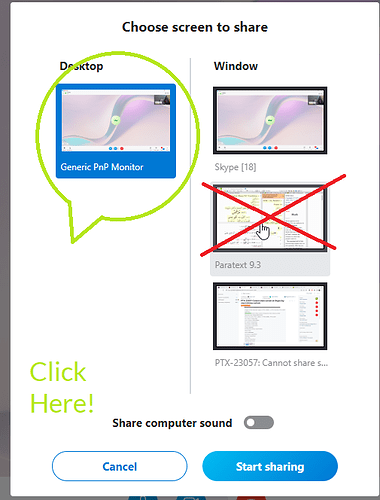
image505×664 69.7 KB
Someone reported they could not share their Paratext screen on a Skype call.
I found it can be done, but it is not obvious.
When you click Share screen on Skype, Skype asks which app you want to share. You can select Paratext here, this seems obvious, but it is WRONG! Selecting Paratext in this way does not actually display Paratext on the Skype call.
If you choose the generic PNP monitor on the left when Skype asks what to share, you can then bring up Paratext on your screen and the caller will see it.
image505×664 69.7 KB
機器翻譯自 English








