Некоторые проекты со временем решают, что не хотят ставить точки или другие знаки препинания в конце своих сносок. Очевидный метод — использовать поиск и замену. Однако легко оставить лишние пробелы между точкой и концом маркера сноски «\f*».
Чтобы найти все точки в конце сносок, независимо от количества пробелов (включая их отсутствие) между точкой и USFM-маркером «\f*», необходимо использовать регулярное выражение.
Регулярное выражение \.\s?\\f\* найдет все точки в конце сносок, независимо от количества пробелов между точкой и \f*.
Эту операцию поиска и замены можно выполнить разными способами, но в диалоговом окне «Поиск и замена» (Find and Replace) в Paratext можно использовать простые регулярные выражения, если ввести «regex:» в поле поиска.
Порядок действий:
- Откройте диалоговое окно «Поиск и замена» (Find and Replace), нажав сочетание клавиш Ctrl+h.
- Введите
regex:\.\s?\\f\* в поле поиска.
- Введите
\f* в поле замены.
- Убедитесь, что в поле Match in: выбрано All text.
- Укажите диапазон для книги или книг, в которых вы хотите удалить точки.
- Установите ограничения (Restrictions) на No Restrictions.
- Нажмите кнопку Replace.
Find-Replace dialogue-21281×1429 202 KB
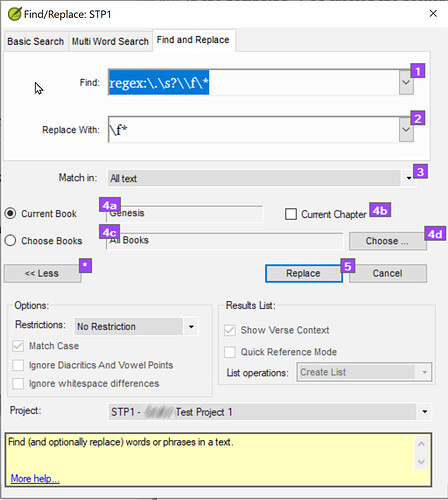
Пример удаления конечных точек для всех сносок в книге Бытия (Genesis)
- Рассматривайте каждое предложенное изменение, нажимая «Да» или «Нет» по мере необходимости.
Редактирование администратора: Исправлено форматирование поста.
Some projects after some time decide that they do not want periods or other sentence final punction at the end of their footnotes. Using find and replace is the obvious method. However, it is easy to have extra spaces between the period and the end of footnote marker “\f*”.
To find all periods at the end of footnotes regardless of the number of spaces (including none) between the period and the USFM “\f*”, a regular expression is needed.
The regular expression \.\s?\\f\* will find all periods at the end of footnotes regardless of the number of spaces between the period and \f*.
This find and replace can be done by various means, but it is possible to use simple regular expressions in Paratext’s Find and Replace dialogue, if “regex:” is typed in the Find box.
Procedure:
- Open the Find and Replace dialogue by typing the shortcut key Ctrl+h.
- Type
regex:\.\s?\\f\* in the Find box.
- Type
\f* in the replace box.
- Verify that the Match in: box is set to All text.
- Set the range for the book or books where you want to delete the periods.
- Set Restrictions to No Restrictions.
- Click on the Replace button.
Find-Replace dialogue-21281×1429 202 KB
Example of remove final periods for all footnotes in Genesis
- Step through each proposed change clicking Yes or No as appropriate.
Admin Edit: Fixed formatting of post.
Переведено машиной с языка English








