Alguns projetos, após algum tempo, decidem que não desejam pontos ou outra pontuação final de frase no final de suas notas de rodapé. Usar encontrar e substituir é o método óbvio. No entanto, é fácil haver espaços extras entre o ponto e o final do marcador de nota de rodapé “\f*”.
Para encontrar todos os pontos no final das notas de rodapé, independentemente do número de espaços (incluindo nenhum) entre o ponto e o “\f*” do USFM, é necessária uma expressão regular.
A expressão regular \.\s?\\f\* encontrará todos os pontos no final das notas de rodapé, independentemente do número de espaços entre o ponto e \f*.
Essa operação de encontrar e substituir pode ser realizada de várias maneiras, mas é possível usar expressões regulares simples no diálogo Encontrar e Substituir do Paratext, se “regex:” for digitado na caixa de Encontrar.
Procedimento:
- Abra o diálogo Encontrar e Substituir digitando a tecla de atalho Ctrl+h.
- Digite
regex:\.\s?\\f\* na caixa de Encontrar.
- Digite
\f* na caixa de Substituir.
- Verifique se a caixa Correspondência em: está definida como Todo o texto.
- Defina o intervalo para o livro ou livros onde você deseja excluir os pontos.
- Defina Restrições como Sem Restrições.
- Clique no botão Substituir.
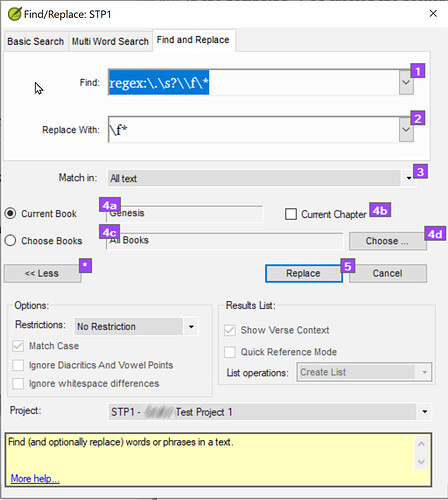
Find-Replace dialogue-21281×1429 202 KB
Exemplo de remoção de pontos finais para todas as notas de rodapé em Gênesis
- Prossiga com cada alteração proposta clicando em Sim ou Não, conforme apropriado.
Edição do Administrador: Formatação da publicação corrigida.
Some projects after some time decide that they do not want periods or other sentence final punction at the end of their footnotes. Using find and replace is the obvious method. However, it is easy to have extra spaces between the period and the end of footnote marker “\f*”.
To find all periods at the end of footnotes regardless of the number of spaces (including none) between the period and the USFM “\f*”, a regular expression is needed.
The regular expression \.\s?\\f\* will find all periods at the end of footnotes regardless of the number of spaces between the period and \f*.
This find and replace can be done by various means, but it is possible to use simple regular expressions in Paratext’s Find and Replace dialogue, if “regex:” is typed in the Find box.
Procedure:
- Open the Find and Replace dialogue by typing the shortcut key Ctrl+h.
- Type
regex:\.\s?\\f\* in the Find box.
- Type
\f* in the replace box.
- Verify that the Match in: box is set to All text.
- Set the range for the book or books where you want to delete the periods.
- Set Restrictions to No Restrictions.
- Click on the Replace button.
Find-Replace dialogue-21281×1429 202 KB
Example of remove final periods for all footnotes in Genesis
- Step through each proposed change clicking Yes or No as appropriate.
Admin Edit: Fixed formatting of post.
Tradução automática de English








