Algunos proyectos, tras un tiempo, deciden que no desean puntos u otra puntuación final de oración al final de sus notas al pie. El método obvio es usar buscar y reemplazar. Sin embargo, es fácil que queden espacios extra entre el punto y el final de la marca de la nota al pie “\f*”.
Para encontrar todos los puntos al final de las notas al pie, sin importar la cantidad de espacios (incluyendo ninguno) entre el punto y la marca USFM “\f*”, se necesita una expresión regular.
La expresión regular \.\s?\\f\* encontrará todos los puntos al final de las notas al pie, sin importar la cantidad de espacios entre el punto y \f*.
Esta búsqueda y reemplazo se puede realizar de diversas maneras, pero es posible usar expresiones regulares simples en el diálogo de Buscar y reemplazar de Paratext, si se escribe “regex:” en el cuadro de Buscar.
Procedimiento:
- Abra el diálogo de Buscar y reemplazar escribiendo la tecla de acceso directo Ctrl+h.
- Escriba
regex:\.\s?\\f\* en el cuadro de Buscar.
- Escriba
\f* en el cuadro de Reemplazar.
- Verifique que el cuadro Buscar en: esté configurado en Todo el texto.
- Establezca el rango para el libro o los libros donde desea eliminar los puntos.
- Configure las Restricciones en Sin restricciones.
- Haga clic en el botón Reemplazar.
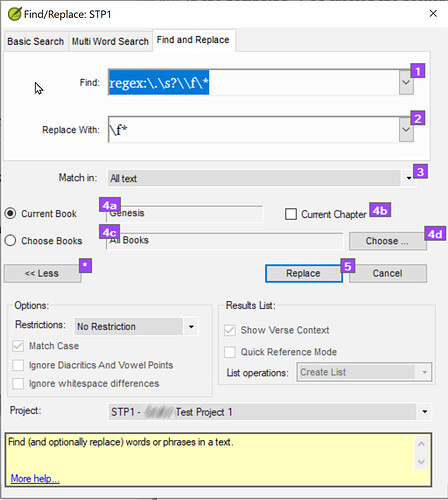
Find-Replace dialogue-21281×1429 202 KB
Ejemplo de eliminación de puntos finales para todas las notas al pie en Génesis
- Revise cada cambio propuesto haciendo clic en Sí o No según corresponda.
Edición del administrador: Se corrigió el formato de la publicación.
Some projects after some time decide that they do not want periods or other sentence final punction at the end of their footnotes. Using find and replace is the obvious method. However, it is easy to have extra spaces between the period and the end of footnote marker “\f*”.
To find all periods at the end of footnotes regardless of the number of spaces (including none) between the period and the USFM “\f*”, a regular expression is needed.
The regular expression \.\s?\\f\* will find all periods at the end of footnotes regardless of the number of spaces between the period and \f*.
This find and replace can be done by various means, but it is possible to use simple regular expressions in Paratext’s Find and Replace dialogue, if “regex:” is typed in the Find box.
Procedure:
- Open the Find and Replace dialogue by typing the shortcut key Ctrl+h.
- Type
regex:\.\s?\\f\* in the Find box.
- Type
\f* in the replace box.
- Verify that the Match in: box is set to All text.
- Set the range for the book or books where you want to delete the periods.
- Set Restrictions to No Restrictions.
- Click on the Replace button.
Find-Replace dialogue-21281×1429 202 KB
Example of remove final periods for all footnotes in Genesis
- Step through each proposed change clicking Yes or No as appropriate.
Admin Edit: Fixed formatting of post.
Traducción automática desde English








