你好。
我也认为,在 Paratext 中,最实用的做法是创建 anon848905 提到的模板,如果你需要的是将注释放在同一文本中。操作注释文件可能会带来更多的问题而不是好处。
我只想补充一点:我们也有选项可以将注释放在 WordList 中。在这种情况下,注释不会出现在文本中,因为它不适用于特定的经文,而是添加了一个相关的词,这使得可以观察到该注释在所有包含该词的经文中。
例如,在下图中,关于词“chaynullami”的注释将指向 272 节经文(右侧的红圈),根据我的筛选,该词出现在这些经文中:
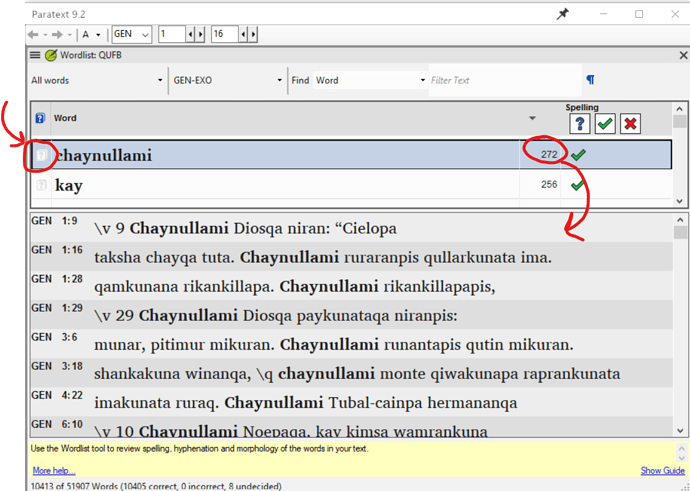
image1126×802 252 KB
当我们在 WordList 中创建注释时,该注释(左侧的红圈)会以蓝色标记,以提示存在注释(就像文本中的红色旗帜一样)。
此选项也可用于圣经术语。
问候,
anon689242.
Hola.
I also consider that the most practical thing we have in Paratext is to create the template that anon848905 mentions, if what you need is to put the notes in the same text. And manipulating the notes file can bring more problems than benefits.
I just want to add that: we also have options to put notes in the WordList. In this case the note does not appear in the text because it does not apply to a specific verse, but a word in question is added and this makes possible the observation of that note to all the verses where this word is present.
As an example, in the following image, a note on the word “chaynullami” will refer to the 272 verses (the red circle on the right) where this word is present according to my filter:
image1126×802 252 KB
When we create a note in the WordList, the note (the red circle on the left) is marked in blue, to warn that there is a note (like the red flags in the text).
This option is also available for Biblical Terms.
Saludos,
anon689242.
机器翻译自 Español








