您是指注册表(Registry)页面吗? https://registry.paratext.org/
我已在站外通过电子邮件向您发送了用于登录的用户名信息。
登录后,请按照以下步骤操作:
- 点击右上角的用户名(1)
- 点击“我的个人资料”(My Profile)(2)
- 点击“项目”(Projects)选项卡(3)
- 点击您想要编辑的项目(4)
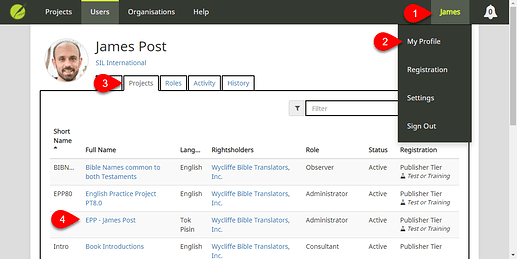
image1119×562 69.7 KB
您也可以从 Paratext 访问项目页面:
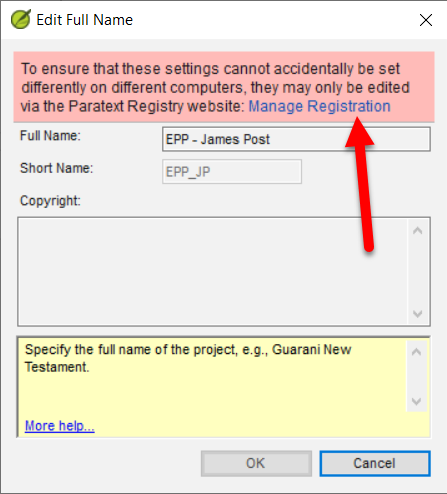
- 点击“项目”(Project)菜单 > “项目设置”(Project settings) > “项目属性”(Project properties)
- 点击“版权信息”(Copyright info)旁边的“编辑”(Edit)
- 点击“管理注册”(Manage Registration)
进入项目页面后:
- 点击“出版”(Publishing)选项卡(1)
- 编辑“版权信息”(Copyright info)(2)
- 点击“保存更改”(Save Changes)按钮
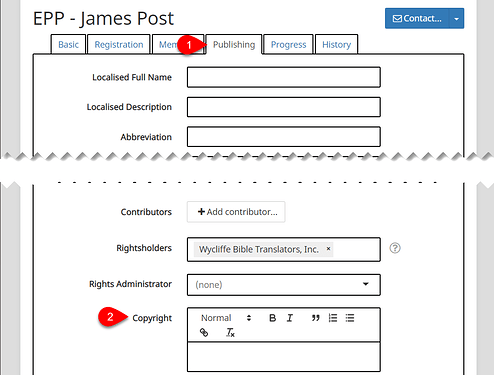
image1017×771 44.6 KB
Do you mean on the Registry page? https://registry.paratext.org/
I emailed you offlist with your username info to login.
Once logged in, follow these steps:
- Click your username in the upper-right corner (1)
- Click My Profile (2)
- Click the Projects tab (3)
- Click the Project you wish to edit (4)
image1119×562 69.7 KB
You can also access the Project page from Paratext:
- Click on the Project menu > Project settings > Project properties
- Click Edit next to the Copyright info
- Click Manage Registration
Once on the Project page:
- Click the Publishing tab (1)
- Edit the Copyright info (2)
- Click the Save Changes button
image1017×771 44.6 KB
机器翻译自 English








