我能夠在電腦上查看,發現 C:\Program Files (x86)\Paratext 9\LocData\fr.xml 檔案是舊版的,所以我從該資料夾中將其移除並重新啟動 Paratext - 這似乎修復了舊 UI 元素的問題。感謝 anon848905 的提醒。
感謝 AWR 指出要檢查該文字集合中的檢視。檢視被設定為預覽(Aperçu),在這種檢視下文字中不會顯示連字號,但在左側的單節窗格中會顯示(請參見 al-masjuun / almasjuun):
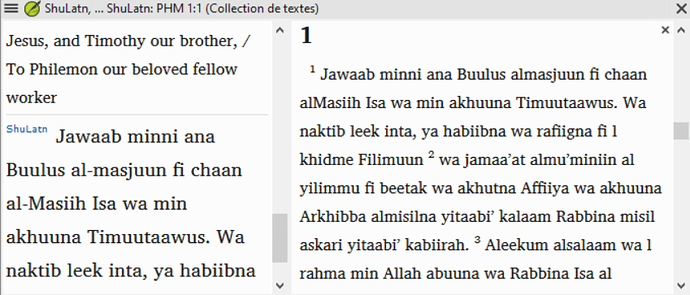
image849×363 102 KB
如果我將檢視更改為標準(Standard),連字號就會出現(同時 SFMs 也會出現,這並沒有太大幫助):
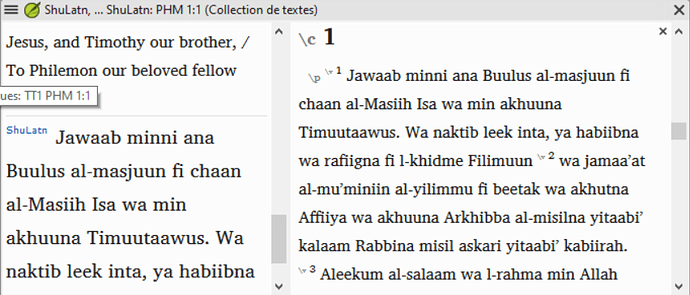
image852×365 102 KB
所以我暫時將檢視保留為標準(Standard),這樣我們就能看到連字號。這在我的電腦上以及翻譯者的電腦上都會發生。但 ShuLatn 現在是一個標準資源,所以開發人員應該能夠重現這個問題。(我會報告這個問題……)這些不是特殊的連字號,只是標準的 U+002D,所以我不知道為什麼會這樣。
感謝你們的幫助。
I was able to look on the computer, and the C:\Program Files (x86)\Paratext 9\LocData\fr.xml file was older, so I pulled it out of that folder and restarted Paratext - that seemed to fix the old UI element problem. Thanks, anon848905, for the reminder.
And thanks, AWR, for the pointer to check the view in that text collection. The view was set to Preview (Aperçu), where the hyphens don’t appear in the text, but they do appear in the single verse pane to the left (see al-masjuun / almasjuun):
image849×363 102 KB
If I change the view to Standard, then the hyphens appear (along with the SFMs, which is not real helpful):
image852×365 102 KB
So I’m leaving the view as Standard for now, so we can have the hyphens. This happens on my computer, as well as on the translator’s computer. But ShuLatn is a standard resource now, so the developers should be able to replicate the problem. (I’ll report a problem…) These are not special hyphens, just the standard U+002D, so I don’t know why it is doing that.
Thanks for your help.
機器翻譯自 English








