0
536 次瀏覽

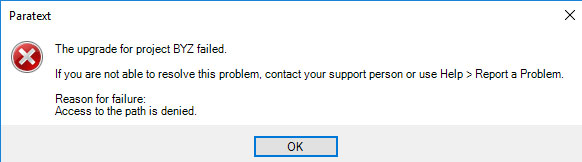
One system gets the message at every starting of Paratext. The message also says, access to path is denied.

There is no folder of file by that name in the My Paratext 8 Projects folder.

I can see a “BYZ” project in the delete project list, so I delete it. No errors, but on restart the message is there again.

There is no “BYZ” project in the PT8 or PT7 project list.byz-proect-error
舊文章 - 以原文顯示
Paratext (1.2k 點) 提出
已重新顯示 | 536 次瀏覽

6 個回答

0
最佳回答

Have you tried using Help > Report a problem (as the message suggests)? To help you, we would likely need the information included in that report.

舊文章 - 以原文顯示
[Expert]
(16.7k 點) 提出
0

BYZ is a resource and so is in a different folder than standard projects. In Paratext 8, it is in the My Paratext 8 Projects/_Resources

Blessings,

Shegnada James

Language Technology and Publishing Coordinator, SIL Nigeria

Text Processing Specialist – Complex Script, GPS, SIL Intl

Skype: Shegnada.james.

[Email Removed]

+1 972 974 8146

舊文章 - 以原文顯示
(1.3k 點) 提出
已重新顯示
0

Like I said, if I go to the “Delete Project” in the menu, BYZ shows as a project. I don’t believe Resources show in that project list.

But I did check the Resources directory and there was no file with the letters BYZ in the Resource directory. I downloaded the BYZxxxx resource hoping it would correct the issue but it did not.

Thanks

舊文章 - 以原文顯示
(1.2k 點) 提出
0

I thought I reported it, Is there a way to verify that?

舊文章 - 以原文顯示
(1.2k 點) 提出

The e-mail address entered into Tools > Registration Information > Your Email Address on the machine that sent the report should have received a confirmation e-mail.

舊文章 - 以原文顯示
0

One of our user’s new computer also gets the “The upgrade for project BYZ failed” message. I’ll do Report a Problem.

For the record, this is a fresh install of PT, and the error appeared the first time that I ran PT. The installer I used is “Paratext_8.0.100.1_InstallerOffline.exe”.

舊文章 - 以原文顯示
(1.4k 點) 提出
已重新顯示

If you have not let Paratext update itself (current version is 8.0.100.76, I think), then that could be the cause.

EDIT: I’ve sent a response to your problem report.

舊文章 - 以原文顯示
0

This is a bug in ParaText8, but can solve it easily.

  1. Project > Delete Project > (in combo box) [1] Select Project to delete
  2. Select “BYZ -”
  3. Click [OK] button to delete “BYZ-”.
  4. Close ParaText
  5. Go to the MyParatext(user project folder) folder
  6. Find “…\paratext_Resources” folder
  7. Delete “BYZ.p8z” files.
  8. Copy “BYZ.p8z” file from another computer.
  9. Copy "“BYZ.p8z” file “…\paratext_Resources” folder
  10. Run ParaText.
  11. That it.
舊文章 - 以原文顯示
(116 點) 提出
已重新顯示

相關問題

0
1 個回答 280 次瀏覽
For projects already uploaded via Send/Receive, why is there now a message that Paratext sent the entire project? ... (that the entire project got uploaded) helpful for users?
[Expert]
Brian
375 提出
已提問 6月 27, 2017
0
3 個回答 413 次瀏覽
每次我和我妻子啟動 Paratext 時,都會收到 Paratext 警告,內容如下: 「您電腦上的 BYZ 資源已損毀或無效 請重新下載 BYZ 資源 在將其加入 ScrTextCollection 之前,必須設定專 ... 入 ScrTextCollection 之前,必須設定專案 GUID」這句話的意思 有什麼建議嗎? 此致, karivalkama
karivalkama 118 提出 已提問 4月 28, 2021
0
2 個回答 235 次瀏覽
我正在嘗試協助一位 Paratext 9 的使用者 當他登入 Paratext 時,會收到此訊息 就他所知,他沒有將「Scr」文本集合作為已儲存的集合 我該如何協助他解決這個問題?請參閱他下方所寫的內容 問候 anon392948 「警告 - 您 ... 希臘文文本 不過,如果您能就我應採取哪些行動以取得未損毀/有效的 BYZ 提供任何啟示,我將不勝感激
anon392948 143 提出 已提問 2月 25, 2021
0
11 個回答 1.5k 次瀏覽
各位好, 每次我開啟 PT 9.1 時,都會收到以下錯誤訊息 我已經下載並在我的電腦上安裝了 BYZ 資源,但仍然收到錯誤訊息。還有其他我應該做的事情嗎? 圖片972×244 82.4 KB 祝好, anon554738
Kevin Nicholas 142 提出 已提問 1月 21, 2021
0
1 個回答 196 次瀏覽
當我開啟某個特定專案(該專案只有一卷書 - XXA)時,會收到此訊息,之後也會間歇性地出現。 專案資料夾中沒有 usfm.sty 檔案,但其他專案似乎也沒有這個檔案。 有什麼線索嗎? 謝謝, EpiWaetMan
EpiWaetMan 196 提出 已提問 2月 3, 2022
Welcome to Support Bible, where you can ask questions and receive answers from other members of the community.
So Peter was kept in prison, but the church was earnestly praying to God for him.
Acts 12:5
3,045 個問題
6,005 個回答
5,671 則評論
2,026 位使用者






