0 голосов
439 просмотров

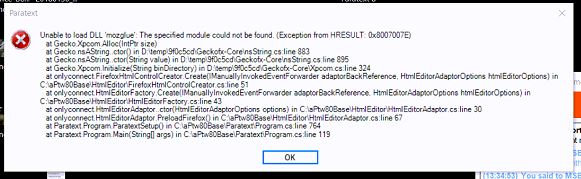
I tried to help a user this morning who was getting this error when starting Paratext 8
didi1

This was the first time the user had tried to use paratext 8 in a little while.

We’ve uninstalled PTx8 and reinstalled it several times. It seems like the ‘remove settings’ option does not actually remove the settings as it remembers the user’s information upon restart.

we tried holding down the shift key when launching Paratext 8, but that didn’t have an affect.

The error comes up after Paratext 8 says that it’s loading the resources.

Any help would be appreciated.

Старое сообщение — показано на исходном языке
Paratext от (478 очков) | 439 просмотров

3 Ответов

0 голосов
Лучший ответ

Does the following file exist on the system with the problem?

c:\windows\system32\MSVCR120.DLL

If not you could try installing:

Visual C++ Redistributable Packages for Visual Studio 2013
https://www.microsoft.com/en-us/download/details.aspx?id=40784

Старое сообщение — показано на исходном языке
от [Moderator]
(2,4тыс. очков)

I will ask about that file.

Старое сообщение — показано на исходном языке

The file was present, but reinstalling Visual Studio 2013 resolved the issue. Thank you for your help.

Старое сообщение — показано на исходном языке
0 голосов

This error is caused by being unable to access a file. This can happen if the file was missing due to a corrupted install (unlikely since you’ve reinstalled several times) or by an overzealous antivirus. I would suggest checking to make sure that the antivirus used is not blocking that file for some reason.

The file is mozglue.dll and should be installed into the C:\Program Files (x86)\Paratext 8\Firefox directory.

Старое сообщение — показано на исходном языке
от [Expert]
(16,7тыс. очков)

Thank you for replying. The user is going to take take a look at his AV. He’s using the native Windows AV software, so I’d be surprised if that was the issue.

Старое сообщение — показано на исходном языке
0 голосов

Adding note RE: “Gecko” crashes so it comes up in searches for crash messages.

Старое сообщение — показано на исходном языке
от (1,2тыс. очков)

Похожие вопросы

0 голосов
1 ответ 309 просмотров
Один из членов нашей команды сталкивается с проблемой: Paratext отказывается открываться и выводит сообщение об ошибке ... признательны за вашу помощь в решении этого вопроса.
Prabhu_beelagi 241 задал вопрос сен 6, 2023
+1 голос
2 ответов 351 просмотров
Some users have had problems starting Paratext 8 after it has been installed and are getting the message: Can ... Removed] to get further assistance. John+Wickberg Paratext Support
[Administrator]
John Wickberg
3,4тыс.
задал вопрос дек 1, 2017
0 голосов
1 ответ 289 просмотров
Мы начинаем замечать ряд случаев, когда обновление до версии 9.1 завершается ошибкой, с сообщением Не удалось ... завершить установку. Возможно, это и есть недостающий шаг?
[Moderator]
dhigby
1,3тыс.
задал вопрос апр 9, 2021
0 голосов
4 ответов 502 просмотров
I've been helping a user with the registration\migration process. We were able to migrate the actual project as well as a ... Can you advise us on how to resolve it? Thank you.
MSEAIT_LT 478 задал вопрос янв 23, 2018
0 голосов
4 ответов 405 просмотров
I have Paratext 8.0.100.4 and FLEx SE 8.3.10.43048 2017/11/09. The Paratext project and FLEx ... system.ArgumentExcpetion CreateLexemeForm.cs:46 Any ideas? Thank you, MSEAIT/LT
MSEAIT_LT 478 задал вопрос ноя 27, 2017
Welcome to Support Bible, where you can ask questions and receive answers from other members of the community.
If anyone destroys God’s temple, God will destroy that person; for God’s temple is sacred, and you together are that temple.
1 Corinthians 3:17
3,047 вопросов
6,007 ответов
5,672 комментариев
2,027 пользователей






