0 votes
203 views

I am working on a single-book publication. In the past for single books, I've been able to put a header with a reference range, but no book name. Now, I cannot get even the reference range to appear, regardless of position (header or footer). I have the latest versions of both PTXprint (3.0.33) and Paratext (9.5) installed. In the Header tab I have selected "Reference Range" for Outer (Right) Header. Chapter and Verse are ticked. USFM markers in Paratext for chapter and verse appear to be correct. The AI Support Agent suggested to look for an option for hiding the header, but I don't see anything that allows me toggle this on or off. What else can I do to troubleshoot?

closed with the note: Solution found and problem resolved.
PTXprint by (102 points)
closed by | 203 views

1 Answer

0 votes

Hi Rebecca, It looks like you're doing exactly the right thing, and it should be giving you what you have asked for, but it obviously isn't at this time.

I have set the same settings and it works for me.
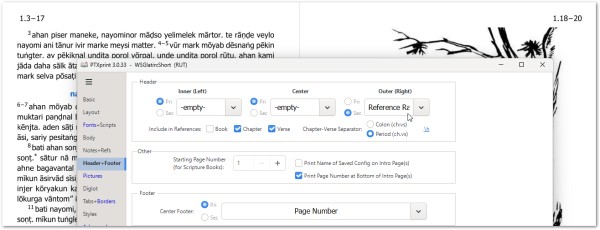
However, I wonder whether the Diglot setting had earlier been enabled, and it has tripped something up in the settings.

Here is a temporary workaround to try resolve it:
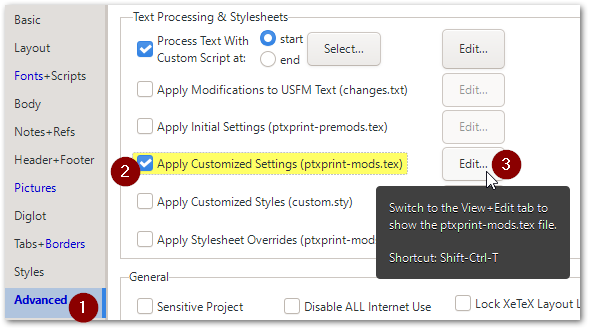
a) On the Advanced tab, enable and edit the ptxprint-mods.tex file:
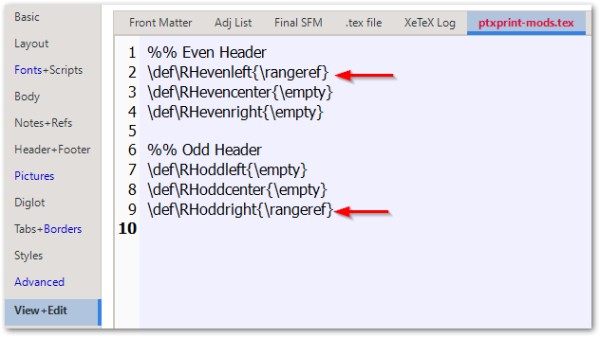
b) Paste in these settings, save the settings and hit Print:

%% Even Header
\def\RHevenleft{\rangeref}
\def\RHevencenter{\empty}
\def\RHevenright{\empty}

%% Odd Header
\def\RHoddleft{\empty}
\def\RHoddcenter{\empty}
\def\RHoddright{\rangeref}
If this still doesn't work, then please create and send in an Archive .zip file using the email address mentioned on the Help tab.

by (3.2k points)
Did that work?
Thanks for this explanation. Unfortunately, that did not work for me and it turns out the solution was quite simple. We did not have anything in the \h field in Paratext. We added the book name there, even though we didn't want the book name in the reference range. As soon as we did that, we were able to produce the reference range with chapter and verse only.

Related questions

0 votes
1 answer 415 views
Hi I've tried a number of options for the scripture reference in the header in PTXPrint, and the behaviour seems a bit ... so would be over-ridden by the above. Any thoughts? Phil
anon913937 124 asked Nov 19, 2025
0 votes
1 answer 227 views
Hi all! I am printing Scripture portions with a Reference Range in the header. On some pages an unwanted hyphen is inserted ... middle of verses 12-15. Thanks for your help! André
Andre_Tousch 116 asked Apr 15, 2021
+1 vote
1 answer 162 views
I'm missing white space separator between the book's name and the chapter number in reference range placed at the ... misconfigured something here? I don't know where to look.
odysiusbt 125 asked Jun 19
0 votes
3 answers 789 views
this is my first time using ptx print but I'm finding it fairly straightforward. However, despite selecting Book (/h) to ... easy to do in the preview app). Thanks for any help.
ASmith 169 asked May 23, 2024
0 votes
2 answers 1.0k views
I'm using PTXprint to export my Paratext project text to PDF files. If I choose Multiple Books under the Basic , Project ... be tedious. Is there a way to do it in one step?
bit 495 asked Jul 4, 2022
Welcome to Support Bible, where you can ask questions and receive answers from other members of the community.
Live in harmony with one another. Do not be proud, but be willing to associate with people of low position. Do not be conceited.
Romans 12:16
3,065 questions
6,025 answers
5,697 comments
2,036 users





