Hola, Rebecca. Parece que estás haciendo exactamente lo correcto y debería darte lo que has solicitado, pero obviamente no lo está haciendo en este momento.
He configurado los mismos ajustes y funciona para mí.
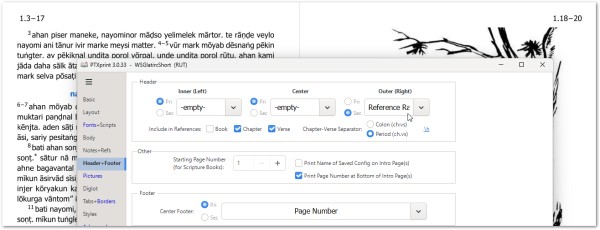
Sin embargo, me pregunto si la configuración Diglot (Bilingüe) se habilitó anteriormente y ha provocado un error en los ajustes.
Aquí hay una solución temporal para intentar resolverlo:
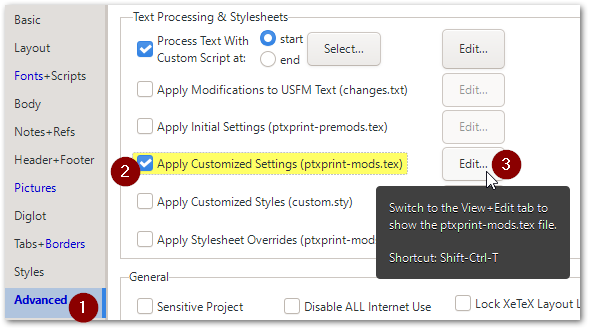
a) En la pestaña Advanced (Avanzado), habilita y edita el archivo ptxprint-mods.tex:
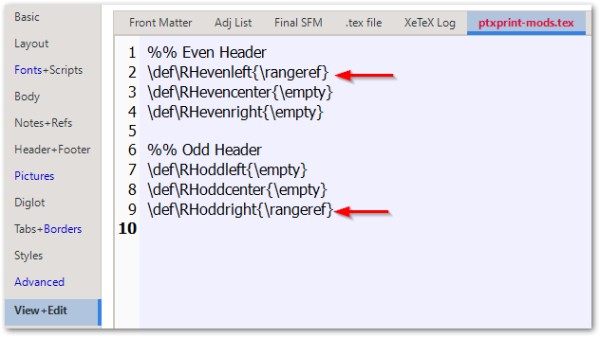
b) Pega estos ajustes, guarda los cambios y presiona Print (Imprimir):
%% Even Header
\def\RHevenleft{\rangeref}
\def\RHevencenter{\empty}
\def\RHevenright{\empty}
%% Odd Header
\def\RHoddleft{\empty}
\def\RHoddcenter{\empty}
\def\RHoddright{\rangeref}
Si esto aún no funciona, crea y envía un archivo Archive (Archivo) .zip utilizando la dirección de correo electrónico mencionada en la pestaña Help (Ayuda).
Hi Rebecca, It looks like you're doing exactly the right thing, and it should be giving you what you have asked for, but it obviously isn't at this time.
I have set the same settings and it works for me.
However, I wonder whether the Diglot setting had earlier been enabled, and it has tripped something up in the settings.
Here is a temporary workaround to try resolve it:
a) On the Advanced tab, enable and edit the ptxprint-mods.tex file:
b) Paste in these settings, save the settings and hit Print:
%% Even Header
\def\RHevenleft{\rangeref}
\def\RHevencenter{\empty}
\def\RHevenright{\empty}
%% Odd Header
\def\RHoddleft{\empty}
\def\RHoddcenter{\empty}
\def\RHoddright{\rangeref}
If this still doesn't work, then please create and send in an Archive .zip file using the email address mentioned on the Help tab.
Traducción automática desde English








