我在雙語版頁眉方面遇到兩個問題:
1. 「根據欄寬調整置中頁眉」(Adjust Center Header Based on Column Widths)無法執行任何操作
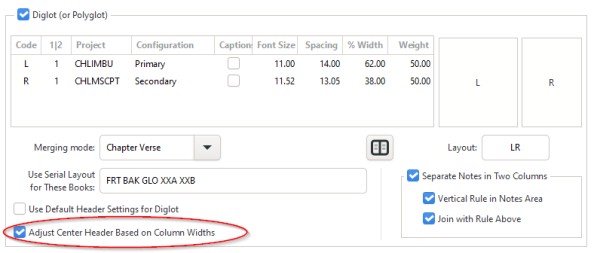
我的雙語版設定如下(已勾選「調整置中頁眉」(Adjust Center Header)):
然而,置中頁眉中的頁碼未能調整以與書脊(gutter)對齊:

2. 首/末行行為不一致
次要文字位於較窄的內側欄,主要文字位於較寬的外側欄。左頁應顯示(兩欄皆然)該頁第一節的經文引用,而右頁應顯示 (兩欄皆然)該頁最後一節的經文引用。也就是說,在跨頁中,讀者可以看到完整的範圍。
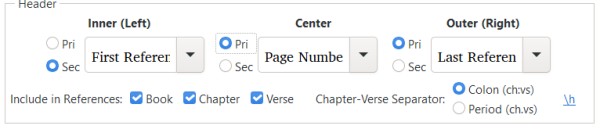
我的頁眉設定如下:
但結果只有 75% 正確。如前圖所示,左頁正確地在每欄上方顯示第一節引用,但右頁在內側欄上方顯示內側欄的第一節引用,在外側欄上方顯示外側欄的最後一節引用。
I'm encountering two problems with diglot headers:
1. "Adjust Center Header Based on Column Widths" fails to do anything
My diglot setting are like this (with "Adjust Center Header" checked):
and yet the page numbers in the center header fail to be adjusted to line up with the gutter:
2. First/Last behavior is inconsistent
The secondary text is in the narrower, inner column, and the primary text is in the wider, outer column. The left page should show (for both columns) the reference of the first verse on the page, while the right page should show (for both columns) the reference of the last verse on the page. That is, between them both, the reader sees the full range on the spread.
My header settings are like this:
But what this results in is only 75% correct. As shown in earlier image, the left page correctly gets the first reference above each column, but the right-hand page gets the first reference of the inner column above the inner column, and the last reference of the outer column above the outer column.
機器翻譯自 English








