我在双栏页眉方面遇到了两个问题:
1. “根据栏宽调整居中页眉”(Adjust Center Header Based on Column Widths)不起作用
我的双栏设置如下(已勾选“调整居中页眉”):
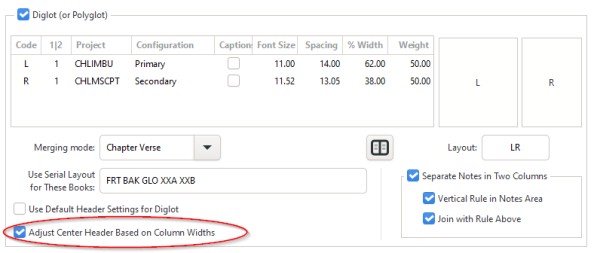
然而,居中页眉中的页码未能调整到与书脊对齐:

2. 首/尾行为不一致
次要文本位于较窄的内侧栏,主要文本位于较宽的外侧栏。左页(两栏均)应显示该页第一节的经文引用,而右页(两栏均)应显示该页最后一节的经文引用。也就是说,在跨页中,读者可以看到完整的范围。
我的页眉设置如下:
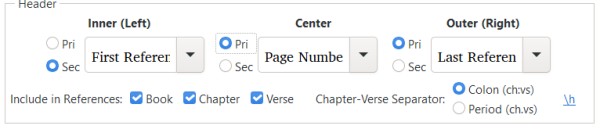
但结果只有 75% 正确。如前图所示,左页正确地在每栏上方显示了首个引用,但右页在内侧栏上方显示了内侧栏的首个引用,在外侧栏上方显示了外侧栏的最后一个引用。
I'm encountering two problems with diglot headers:
1. "Adjust Center Header Based on Column Widths" fails to do anything
My diglot setting are like this (with "Adjust Center Header" checked):
and yet the page numbers in the center header fail to be adjusted to line up with the gutter:
2. First/Last behavior is inconsistent
The secondary text is in the narrower, inner column, and the primary text is in the wider, outer column. The left page should show (for both columns) the reference of the first verse on the page, while the right page should show (for both columns) the reference of the last verse on the page. That is, between them both, the reader sees the full range on the spread.
My header settings are like this:
But what this results in is only 75% correct. As shown in earlier image, the left page correctly gets the first reference above each column, but the right-hand page gets the first reference of the inner column above the inner column, and the last reference of the outer column above the outer column.
机器翻译自 English








