我似乎不知道如何使用“视图与编辑”(View & Edit)下的“外围元素”(Peripherals)选项卡和“前置部分”(Front Matter)选项卡。自动生成的前置部分包含 \periph Title Page|id="title" 和 \periph Publication Data|id="pubdata" 等内容。但是这些语句中的 id="xxxx" 部分会导致运行挂起。它似乎正在某处查找 "title" 和 "pubdata" 等。但具体在哪里呢?抱歉问了个愚蠢的问题,但我就是找不到答案。 幻灯片 297 提到了这一点,但没有提供足够的信息来修复这个问题。这里似乎有一些我遗漏的隐含信息。 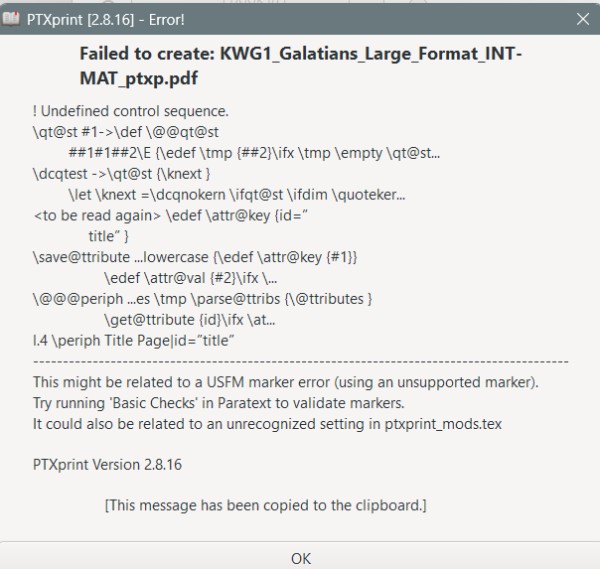
I seem at a loss as to how to use the Peripherals tab and the Front Matter tab under View & Edit. The auto generated Front Matter has \periph Title Page|id="title" and \periph Publication Data|id="pubdata" etc. But the id="xxxx" part of these statements make the run hang. It seems to be looking for "title" and "pubdata" etc somewhere. But where? Sorry for a dumb question, but I just can't find the answer. Slide 297 mentions it, but doesn't tell me enough to fix the problem. It seems like there is some implied information I am missing here.
机器翻译自 English








