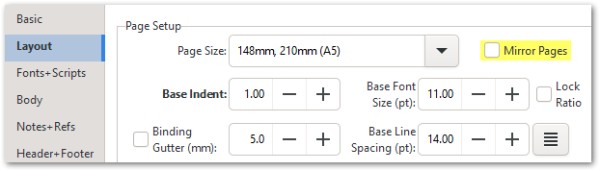
簡短的回答是關閉(停用)版面(Layout)分頁中的鏡像頁面(Mirror Pages)選項:
這將修復頁面左右互換的問題,但您可能需要手動覆蓋頁眉設定,以確保每個左/右(或內/外)頁面組合顯示適當的文體。(如果您需要協助,請告訴我。)
[我猜測未來我們需要重新思考鏡像設定應該如何運作,並可能將其拆分為兩個控制項,分別控制頁面和頁眉資訊。]
The quick answer is to turn OFF (disable) the Mirror Pages option on the Layout tab:
This will fix the pages swapping sides, but you will probably need to manually override the header settings to get the appropriate script(s) on each left/right (or inner/outer) combination. (Let me know if you need any assistance with that).
[My guess is that in future we need to rethink what the mirror setting should do, and possibly split it into 2 controls that control pages and header information separately.]
機器翻譯自 English








