由現場需求驅動的改進
我謹代表 Paratext Lite 的開發團隊(僅有兩人),感謝 Biblica 主動聯繫我們,請求我們團隊關注一項能真正幫助他們在現場進行翻譯工作的功能。Biblica 團隊的 Tatyana 主動聯繫並與我們團隊互動,協助我們開發了「行內註釋編輯」功能,這是本次發布的主要更新。感謝 Tatyana 和 Biblica 團隊!我們深信,由現場需求驅動的開發理念能夠並將會改善此產品,讓真正的用戶能更好地在現場使用 Paratext Lite。從而讓更多人得以接觸上帝的話語,使人的生命得到轉變,並讓上帝的名被尊為至大且更至大。
新增的主要功能
- 應 Biblica 要求而開發的實驗性行內註釋編輯器。
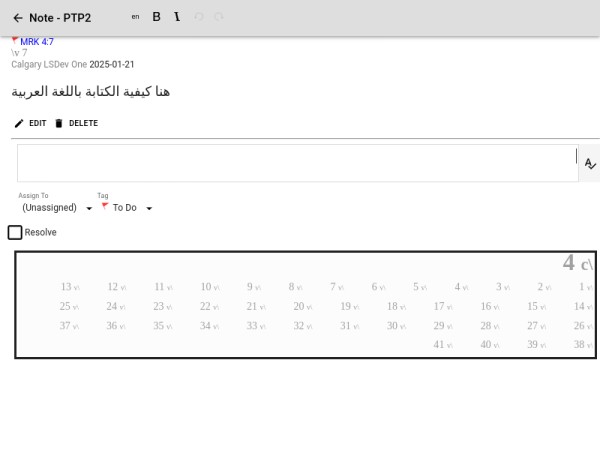
要開始使用此功能,您需要在「主選單」(Main menu)中找到「選項」(Options)下拉選單,並選擇「進階」(Advanced)選項中的「啟用行內註釋編輯」(Enable Inline Note Editing)功能。當您編輯註釋時,將出現一個編輯面板,您可以在查看註釋所對應的背景經文的情況下編輯註釋。如果您不需要上下文,並希望註釋編輯器佔滿整個面板,請點擊「[ ]」展開選項。
行內編輯器
行內編輯器 展開狀態
其他新增功能
- 可以使用主選單中「獲取資源」(Get Resources)的「本地」(Local)選項,從本地網路安裝資源
- 可以在部分創建的書卷中創建章節
一些錯誤修復和一般改進
- 修復了進階選項中的核取方塊未保留的問題
- 解決了權限對話框的問題
- 修復了從右至左(RTL)語言的註釋編輯器裁剪問題
- 修復了在行內註釋編輯器中編輯註釋時,自動更正按鈕幾乎不可見的問題
感謝
感謝您對使此產品達到最佳狀態的興趣與貢獻!
Field driven improvements
On behalf of the small (two people) Paratext Lite team I want to thank Biblica for reaching out to us to request our team to look at something that would really help their teams' translation work on the field. Tatyana, of the Biblica team reached out and has interacted with our team to help us put together the "inline notes editing" feature which is the major update of this release. Thanks Tatyana and the Biblica team! We are convinced that field driven development ideas can and will improve this product so that real users can make better use of Paratext Lite on the field. So that more and more people will have access to God's Word. So that people's lives are transformed and that God's name will be known as great and greater.
The main goody added
- the experimental inline note editor which had been requested by Biblica.
To begin to make use of this feature, you need to select ""Enable Inline Note Editing" feature in the "Advanced" pull down option of the "Options" selection which you find on the "Main menu". As you edit your notes, you will have an editing pane where you can edit your notes while still being able to see the background text in which the note is for. If you don't need the context and want the note editor to take up the full panel, then click on the "[ ]" expand option.
Inline editor
Inline editor expanded
Other goodies added
- Resources can be installed from the local network using the "Local" option for "Get Resources" from the main menu
- Ability to create a chapter in partially created books
Some bug fixes and general improvements
- advanced option checkboxes not retained bug fixed
- permissions dialog issue resolved
- fixed the notes editor clipping bug for RTL languages
- issue fix for hardly visible autocorrect button in inline notes editor when editing notes
Thank you
Thank you for your interest and contribution to make this product the best we can make it!
機器翻譯自 English








