Merci d'avoir envoyé l'archive. Je ne suis toujours pas sûr de ce qui différenciait votre nouveau PDF, mais j'ai découvert qu'il existe déjà un .pdf (mal nommé) dans le dossier C:\Program Files\ptxprint\PDFassets\border-art qui est « plus haut » et conçu pour le script arabe :
A5 section head border(RTL).pdf - malheureusement, il ne fonctionne pas tel quel, en raison des (parenthèses) dans le nom du fichier (mais cela sera corrigé dans la prochaine version de PTXprint).
Mais, en tant que solution de contournement, si vous changez le nom du fichier PDF et utilisez ensuite ce PDF, il fonctionne très bien pour ce dont vous avez besoin et se met à l'échelle sans se déformer.
Ainsi, par exemple, changez le nom en :
A5 section head border-RTL-taller.pdf
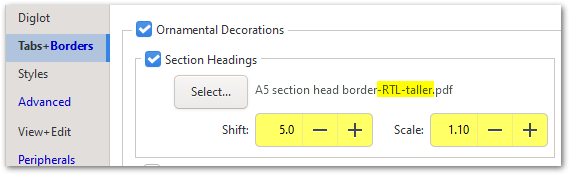
Notez que vous pouvez également DÉPLACER légèrement le graphique vers le bas et L'AGRANDIR si nécessaire.
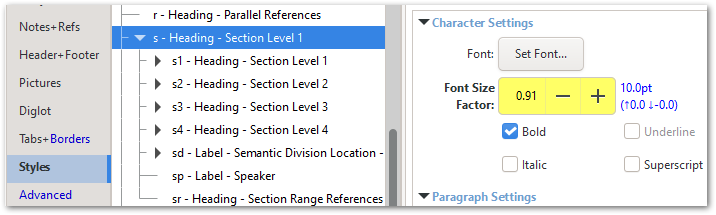
Vous voudrez peut-être envisager d'apporter une petite modification de taille au style \s afin que les diacritiques supérieurs et inférieurs tiennent tous dans l'espace disponible.
Tout s'adapte assez bien une fois que vous avez les bons paramètres !
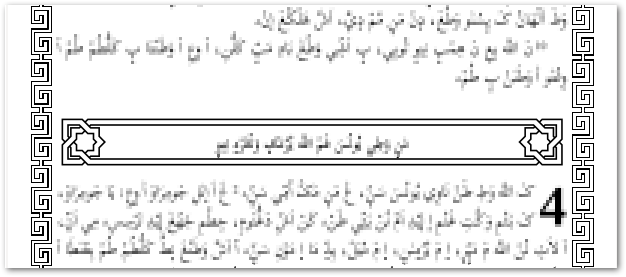
Il semble que la bordure de texte générée dynamiquement ait également besoin d'ajuster certains paramètres :
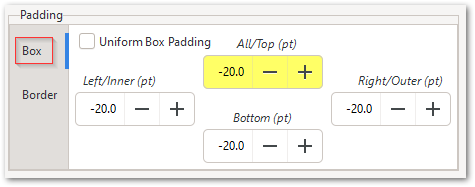
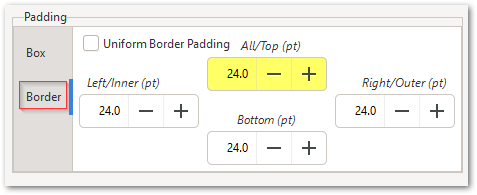
Notez qu'il existe des paramètres de marge intérieure de la boîte (Box padding) et de marge de la bordure (Border padding) ; et il pourrait être utile d'utiliser une marge intérieure de boîte (Box Padding) négative.
Thanks for sending the archive. I'm still not sure how your new PDF was different, but I found that there is already a (badly named) .pdf in the C:\Program Files\ptxprint\PDFassets\border-art folder which is 'taller' and designed for Arabic script:
A5 section head border(RTL).pdf - unfortunately, it doesn't work as it is, due to the (parentheses) in the filename (but this will be fixed in the next release of PTXprint).
But, as a workaround, if you change the PDF file name and then use that PDF, it works very well for what you need, and scales without distorting.
So, for example, change the name to be:
A5 section head border-RTL-taller.pdf
Notice that you can also SHIFT the graphic down slightly, and SCALE it to be larger if needed.
And you may want to consider making a small change in size to the \s Style so that the upper and lower diacritics all fit in the space available.
It all fits quite well once you've got the right settings!
It looks like the dynamically-generated Text Border also needs some settings tweaked:
Note that there are Box padding and Border padding settings; and it might help to use negative Box Padding.
Traduit automatiquement depuis English








