我想我找到了一個方法,能達到我想要的效果。在 A5 紙張上,我使用了 45mm 的裝訂槽(Binding Gutter),選取了外側槽(Outer Gutter),然後選取了標記與輔助線(Marks & Guides),特別是網格(方格紙)(Grid (Graph Paper))。在介面中,我選取了顏色,並將次要分割線的線寬設為零。
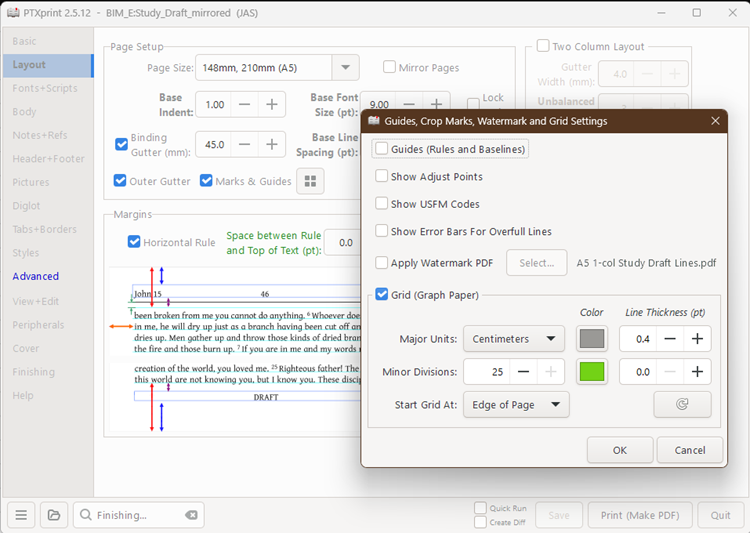
接著,我將 "ptx-cropmarks.tex" 檔案中的整個 "\doGraphPaper" 函式複製並貼上到 "ptxprint-mods.tex" 欄位中。然後我對其進行了修改,使其符合我的需求。
我基本上透過取消它們來關閉垂直線,然後我修改了水平線,使其成為我想要的樣子。我透過調整頂部偏移量,將頂部線條與「水平規則」(來自版面配置分頁中介面的邊距)對齊。因為我想使用外側槽,所以我使用 "\ifodd\pageno...\else" 策略來分別為左右兩側設定線條。可以定義 "\GraphPaperY" 屬性來改變線條之間的間距。同樣地,我的數值也是基於使用 A5 紙張。
以下是我添加到 "ptxprint-mods.tex" 中的程式碼:
\def\doGraphPaper{%
\bgroup\topskip=0pt\baselineskip=0pt\parindent=0pt\everypar{}\relax
\def\GraphPaperYoffset{1.81cm}
%vertical rules
%
\def\th@sgprule{Major}%
\def\gp@type{GraphPaper}%
\count255=\GraphPaperMajorDiv
\dimen1=\GraphPaperX
\dimen2=\pdfpagewidth
\dimen3=\pdfpageheight
\dimen0=\GraphPaperYoffset
% \advance\dimen3 by -\dimen0
\advance\dimen3 by -50\dimen0
\advance\dimen2 by -2\dimen1
\advance\dimen2 by -\GraphPaperXoffset
\setbox0=\hbox{\kern\GraphPaperXoffset\gp@vrule}%
\gp@step
\gp@vrules
\vbox to 0pt{\hbox to 0pt{\unhbox 0\gp@vrule\hss}\vss}%
% Horizontal rules
%
\def\th@sgprule{Major}%
\count255=\GraphPaperMajorDiv
\def\GraphPaperY{0.3535mm}% For less space between lines
\dimen1=\GraphPaperY
\dimen2=\pdfpageheight
\advance\dimen2 by -\dimen1
\ifodd\pageno
\dimen3=.5\pdfpagewidth
\def\GraphPaperXoffset{9.5cm}% Beginning of line
\dimen0=\GraphPaperXoffset
\advance\dimen3 by -0.325\dimen0 % leave 1cm between end of line and right margin
\else
\dimen3=\pdfpagewidth
\def\GraphPaperXoffset{1.0cm}
\dimen0=\GraphPaperXoffset
\advance\dimen3 by -10.5\dimen0 % leave 1cm between end of line and inside margin
\fi
\setbox0=\vbox{\kern\GraphPaperYoffset\gp@hrule}%
\gp@step
\gp@hrules
\vbox to 0pt{\unvbox 0\vss}%
\cp@p\global\let\l@stgprule\empty
\egroup
}
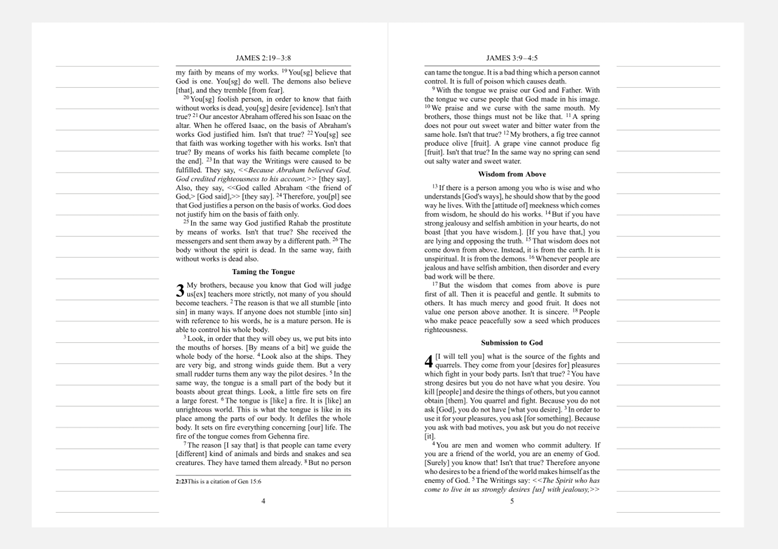
我確定這可以寫得更優雅!我當時是在邊學邊做,並利用現有的內容。但這是由此產生的版面配置:
I think I worked something out that gives me what I'm looking for. On A5 paper, I used a Binding Gutter of 45mm, selected Outer Gutter, and then selected the Marks & Guides, then specifically the Grid (Graph Paper). In the UI, I selected the color, and I turned the minor divisions line thickness to zero.
I then copied the entire "\doGraphPaper" function from the "ptx-cropmarks.tex" file and pasted it into the "ptxprint-mods.tex" field. I then modified it to make it work for me.
I turned the vertical lines off by basically undoing them, and then I changed the horizontal lines into what I wanted them to be. I lined up the top line with the "Horizontal Rule" (from the UI's Margins on the Layout tab) by changing the top offset. Because I wanted to use the outer gutter, I used an "\ifodd\pageno...\else" strategy to set the lines for one side and the other separately. The "\GraphPaperY" property can be defined to change the space between the lines. Again, I based the numbers on using A5 paper.
Here's the code I added into "ptxprint-mods.tex":
\def\doGraphPaper{%
\bgroup\topskip=0pt\baselineskip=0pt\parindent=0pt\everypar{}\relax
\def\GraphPaperYoffset{1.81cm}
%vertical rules
%
\def\th@sgprule{Major}%
\def\gp@type{GraphPaper}%
\count255=\GraphPaperMajorDiv
\dimen1=\GraphPaperX
\dimen2=\pdfpagewidth
\dimen3=\pdfpageheight
\dimen0=\GraphPaperYoffset
% \advance\dimen3 by -\dimen0
\advance\dimen3 by -50\dimen0
\advance\dimen2 by -2\dimen1
\advance\dimen2 by -\GraphPaperXoffset
\setbox0=\hbox{\kern\GraphPaperXoffset\gp@vrule}%
\gp@step
\gp@vrules
\vbox to 0pt{\hbox to 0pt{\unhbox 0\gp@vrule\hss}\vss}%
% Horizontal rules
%
\def\th@sgprule{Major}%
\count255=\GraphPaperMajorDiv
\def\GraphPaperY{0.3535mm}% For less space between lines
\dimen1=\GraphPaperY
\dimen2=\pdfpageheight
\advance\dimen2 by -\dimen1
\ifodd\pageno
\dimen3=.5\pdfpagewidth
\def\GraphPaperXoffset{9.5cm}% Beginning of line
\dimen0=\GraphPaperXoffset
\advance\dimen3 by -0.325\dimen0 % leave 1cm between end of line and right margin
\else
\dimen3=\pdfpagewidth
\def\GraphPaperXoffset{1.0cm}
\dimen0=\GraphPaperXoffset
\advance\dimen3 by -10.5\dimen0 % leave 1cm between end of line and inside margin
\fi
\setbox0=\vbox{\kern\GraphPaperYoffset\gp@hrule}%
\gp@step
\gp@hrules
\vbox to 0pt{\unvbox 0\vss}%
\cp@p\global\let\l@stgprule\empty
\egroup
}
I'm sure it could be done more elegantly! I was trying to learn on the fly and use what was already there. But this is the layout that came from it:
機器翻譯自 English








